Detecting Insider Threats on Kubernetes: Audit Logs, RBAC Anomalies, and eBPF Enforcement
Quick answer
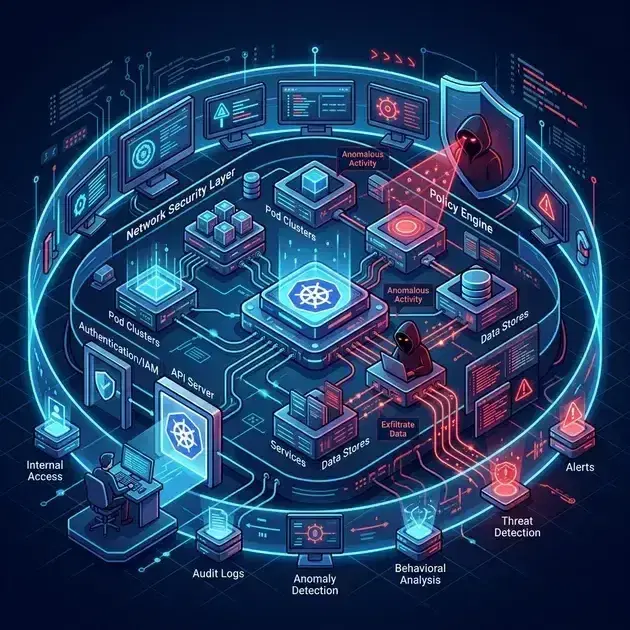
External attackers probe from outside. Insiders already have credentials. Detecting them on Kubernetes means knowing which audit events expose reconnaissance, which RBAC mutations signal privilege escalation, and how eBPF enforcement stops credential theft and data exfiltration before they complete.
- The Insider Threat Kill Chain on Kubernetes
- Layer 1: Kubernetes Audit Logging
- Layer 2: Falco Rules for RBAC and Credential Patterns
- Layer 3: Tetragon Enforcement
- Connecting the Layers
14 min read · Security
External attackers have to get in first. They need a vulnerability, a phishing victim, a misconfigured endpoint. An insider — a disgruntled engineer, a contractor with lingering access, a compromised developer account — starts inside your trust boundary with valid credentials. They're already authenticated. They're already authorized, at least partially. The question is whether your cluster can tell the difference between normal operations and someone quietly escalating privileges, reading secrets they shouldn't, or exfiltrating data before anyone notices.
Kubernetes gives you the tools. Most teams don't configure them. This post covers the three layers that matter: audit logging (what happened at the API level), RBAC anomaly detection (who tried to expand their permissions), and eBPF enforcement (blocking credential access and exfiltration at the kernel level).
The Insider Threat Kill Chain on Kubernetes
An insider attack follows a recognizable progression. Understanding the stages tells you what to instrument at each layer.
1. Reconnaissance: Enumeration of what they can access. kubectl auth can-i --list, listing secrets and configmaps, describing service accounts. These generate SelfSubjectRulesReview and SelfSubjectAccessReview API calls — legitimate from a CI pipeline, suspicious from an interactive session at 11pm from a home IP.
2. Privilege escalation: Exploiting overly permissive RBAC to acquire higher access. Creating a ClusterRoleBinding that grants themselves cluster-admin, creating a privileged pod in a system namespace, requesting a token for a more privileged service account, or abusing a pods/exec permission to exec into a privileged container they don't own.
3. Credential theft: Reading service account tokens, pulling secrets, extracting credentials from ConfigMaps or environment variables. At runtime, this means reading /var/run/secrets/kubernetes.io/serviceaccount/token or accessing etcd directly if the insider has node access.
4. Lateral movement: Using stolen credentials or the compromised pod to reach other services — internal databases, other namespaces, the AWS metadata endpoint for IRSA tokens.
5. Exfiltration: Copying data out. Either via kubectl cp, outbound network connections from a compromised pod, or creating CronJobs that periodically push data to an external endpoint.
Each stage leaves traces. Audit logs capture stages 1–3 and 5. eBPF tooling (Falco, Tetragon) captures stages 3–5 at the syscall and kernel level, below what application logging can see.
Layer 1: Kubernetes Audit Logging
The API server's audit log is the authoritative record of every call made to the cluster. By default, most managed Kubernetes distributions log very little. You need to configure an audit policy that captures the events that matter for insider threat detection without flooding storage with noise.
Audit Policy Configuration
The audit policy controls which events are logged and at what verbosity level:
None— don't logMetadata— log who, what, when, and whether it succeeded — but not request/response bodiesRequest— log the request body tooRequestResponse— log both request and response bodies
For insider threat detection, the events worth capturing at RequestResponse are small in volume but high in signal:
1# /etc/kubernetes/audit-policy.yaml
2apiVersion: audit.k8s.io/v1
3kind: Policy
4rules:
5  # RBAC mutations — highest priority
6  - level: RequestResponse
7    verbs: ["create", "update", "patch", "delete"]
8    resources:
9      - group: "rbac.authorization.k8s.io"
10        resources:
11          - clusterrolebindings
12          - rolebindings
13          - clusterroles
14          - roles
15
16  # Secret reads — who is reading which secrets
17  - level: RequestResponse
18    verbs: ["get", "list", "watch"]
19    resources:
20      - group: ""
21        resources: ["secrets"]
22
23  # Service account token requests
24  - level: RequestResponse
25    verbs: ["create"]
26    resources:
27      - group: ""
28        resources: ["serviceaccounts/token"]
29
30  # Pod exec and port-forward — interactive access to running containers
31  - level: Metadata
32    verbs: ["create"]
33    resources:
34      - group: ""
35        resources: ["pods/exec", "pods/portforward", "pods/attach"]
36
37  # Privilege enumeration (auth can-i --list)
38  - level: Metadata
39    resources:
40      - group: "authorization.k8s.io"
41        resources:
42          - selfsubjectaccessreviews
43          - selfsubjectrulesreviews
44
45  # Privileged pod creation
46  - level: Request
47    verbs: ["create"]
48    resources:
49      - group: ""
50        resources: ["pods"]
51    namespaces: ["kube-system", "kube-public", "cert-manager", "monitoring"]
52
53  # Everything else — metadata only
54  - level: Metadata
55    omitStages:
56      - RequestReceived
Pass this to the API server with --audit-policy-file=/etc/kubernetes/audit-policy.yaml and --audit-log-path=/var/log/kubernetes/audit.log. On EKS, enable control plane logging in the cluster configuration — audit logs go to CloudWatch Logs under /aws/eks/<cluster-name>/cluster. On GKE, Cloud Audit Logs captures these automatically.
Parsing Audit Events
Audit log entries are newline-delimited JSON. The key fields for insider threat analysis:
1{
2  "kind": "Event",
3  "apiVersion": "audit.k8s.io/v1",
4  "level": "RequestResponse",
5  "auditID": "abc-123",
6  "stage": "ResponseComplete",
7  "requestURI": "/api/v1/namespaces/production/secrets/db-password",
8  "verb": "get",
9  "user": {
10    "username": "[email protected]",
11    "groups": ["system:authenticated", "developers"]
12  },
13  "sourceIPs": ["203.0.113.45"],
14  "userAgent": "kubectl/v1.30.0",
15  "objectRef": {
16    "resource": "secrets",
17    "namespace": "production",
18    "name": "db-password"
19  },
20  "responseStatus": {"code": 200},
21  "requestReceivedTimestamp": "2026-05-29T22:47:13Z"
22}
The userAgent field deserves attention. kubectl/v1.30.0 means a human ran a command. Go-http-client/2.0 without a recognizable agent suggests programmatic access, possibly a script. An unusual agent string on an event type that should only come from CI pipelines (like a token request) is a red flag.
Quick extraction of pods/exec events for the last 24 hours:
1jq 'select(
2  .objectRef.subresource == "exec" and
3  .verb == "create" and
4  .responseStatus.code == 101
5) | {
6  time: .requestReceivedTimestamp,
7  user: .user.username,
8  pod: .objectRef.name,
9  namespace: .objectRef.namespace,
10  sourceIP: .sourceIPs[0],
11  userAgent: .userAgent
12}' /var/log/kubernetes/audit.log
ClusterRoleBinding creation — the clearest signal of privilege escalation:
1jq 'select(
2  .objectRef.resource == "clusterrolebindings" and
3  (.verb == "create" or .verb == "patch")
4) | {
5  time: .requestReceivedTimestamp,
6  user: .user.username,
7  verb: .verb,
8  binding: .objectRef.name,
9  sourceIP: .sourceIPs[0]
10}' /var/log/kubernetes/audit.log
Secret reads across namespaces — should almost never come from human users in production:
1jq 'select(
2  .objectRef.resource == "secrets" and
3  .verb == "get" and
4  .responseStatus.code == 200 and
5  (.user.username | startswith("system:serviceaccount:") | not)
6) | {
7  time: .requestReceivedTimestamp,
8  user: .user.username,
9  secret: .objectRef.name,
10  namespace: .objectRef.namespace,
11  sourceIP: .sourceIPs[0]
12}' /var/log/kubernetes/audit.log
The last query is the one that has caught real incidents: a developer reading production secrets directly with kubectl get secret ... -o jsonpath, from a home IP, at an unusual time.
Layer 2: Falco Rules for RBAC and Credential Patterns
Falco can consume Kubernetes audit events directly when configured as an audit webhook sink. This lets you write real-time alert rules against the audit stream rather than post-processing log files.
Configure the API server to send audit events to Falco:
1# /etc/kubernetes/audit-webhook-config.yaml
2apiVersion: v1
3kind: Config
4clusters:
5  - name: falco
6    cluster:
7      server: http://falco.falco.svc.cluster.local:9765/k8s-audit
8current-context: default-context
9preferences: {}
10contexts:
11  - name: default-context
12    context:
13      cluster: falco
14      user: ""
15users: []
Pass --audit-webhook-config-file and --audit-webhook-batch-max-wait=5s to the API server. Now Falco's k8s_audit rules fire in real time.
Rules for Insider Patterns
1# Privilege escalation via ClusterRoleBinding
2- rule: ClusterRoleBinding Created by Non-System User
3  desc: A non-system user created or patched a ClusterRoleBinding
4  condition: >
5    (ka.verb in (create, patch, update)) and
6    ka.target.resource = clusterrolebindings and
7    not ka.user.name startswith "system:"
8  output: >
9    ClusterRoleBinding mutation by non-system user
10    (user=%ka.user.name binding=%ka.target.name
11    role=%ka.req.binding.role sourceIP=%ka.source.ip)
12  priority: CRITICAL
13  source: k8s_audit
14  tags: [rbac, privilege_escalation, insider_threat]
15
16# Token request for elevated service account
17- rule: Service Account Token Requested for System Namespace SA
18  desc: A token was requested for a service account in kube-system
19  condition: >
20    ka.verb = create and
21    ka.target.resource = serviceaccounts and
22    ka.target.subresource = token and
23    ka.target.namespace in (kube-system, kube-public) and
24    not ka.user.name startswith "system:"
25  output: >
26    Token requested for privileged service account
27    (user=%ka.user.name sa=%ka.target.name
28    namespace=%ka.target.namespace sourceIP=%ka.source.ip)
29  priority: CRITICAL
30  source: k8s_audit
31  tags: [credential_access, insider_threat]
32
33# Exec into a pod the user doesn't own (different namespace)
34- rule: Exec Into Privileged Namespace Pod
35  desc: kubectl exec into a pod in a system namespace
36  condition: >
37    ka.verb = create and
38    ka.target.subresource = exec and
39    ka.target.namespace in (kube-system, cert-manager, monitoring) and
40    not ka.user.name startswith "system:"
41  output: >
42    Exec into pod in privileged namespace
43    (user=%ka.user.name pod=%ka.target.name
44    namespace=%ka.target.namespace sourceIP=%ka.source.ip)
45  priority: WARNING
46  source: k8s_audit
47  tags: [execution, insider_threat]
48
49# Enumeration — auth can-i --list
50- rule: Kubernetes Privilege Enumeration
51  desc: User ran kubectl auth can-i --list (SelfSubjectRulesReview)
52  condition: >
53    ka.verb = create and
54    ka.target.resource = selfsubjectrulesreviews
55  output: >
56    Permission enumeration detected
57    (user=%ka.user.name sourceIP=%ka.source.ip
58    userAgent=%ka.useragent)
59  priority: WARNING
60  source: k8s_audit
61  tags: [discovery, insider_threat]
For runtime detection of service account token reads at the syscall level (separate from the audit stream, using Falco's default syscall source):
1# Detects any process reading the mounted SA token
2- rule: Service Account Token Read
3  desc: A process read the Kubernetes service account token file
4  condition: >
5    open_read and
6    fd.name startswith "/var/run/secrets/kubernetes.io/serviceaccount/" and
7    not proc.name in (known_sa_token_consumers)
8  output: >
9    Service account token read
10    (proc=%proc.name pid=%proc.pid user=%user.name
11    file=%fd.name container=%container.id
12    image=%container.image.repository)
13  priority: WARNING
14  tags: [credential_access, container, insider_threat]
15
16# Known processes that legitimately read the token
17- list: known_sa_token_consumers
18  items: [java, python3, python, node, ruby, dotnet]
The known_sa_token_consumers list needs tuning for your environment — the SDK runtimes that legitimately use the mounted token. Anything outside this list reading the token file is worth alerting on.
Server & SSH Hardening Checklist
The firewall, SSH, fail2ban, and update baseline every internet-facing Linux box should pass. Plain Markdown you can run down in an afternoon.
Free. Instant download. You'll also get the occasional deep-dive from the newsletter — unsubscribe anytime.
Layer 3: Tetragon Enforcement
Falco detects and alerts. Tetragon enforces — it can kill a process mid-syscall before the action completes. For insider threats, the most valuable enforcement scenarios are blocking shell execution inside containers that should never have interactive shells, and detecting processes reading credential files they have no legitimate reason to access.
See eBPF Observability: Tetragon, Hubble, and Pixie for Tetragon architecture and deployment. The focus here is the TracingPolicies.
Block Shell Execution in Production Containers
Most production containers should never run /bin/bash or /bin/sh interactively. If kubectl exec drops an insider into a shell, Tetragon can kill it before they run a single command:
1apiVersion: cilium.io/v1alpha1
2kind: TracingPolicyNamespaced   # namespace-scoped — applies only to pods in this namespace
3metadata:
4  name: block-shells-in-production
5  namespace: production
6spec:
7  kprobes:
8    - call: "security_bprm_check"
9      syscall: false
10      args:
11        - index: 0
12          type: "linux_binprm"
13      selectors:
14        - matchArgs:
15            - index: 0
16              operator: "Equal"
17              values:
18                - "/bin/bash"
19                - "/bin/sh"
20                - "/usr/bin/bash"
21                - "/usr/bin/sh"
22          matchActions:
23            - action: Sigkill
TracingPolicyNamespaced (available in Tetragon 0.11+) is namespace-scoped — it applies only to pods running in the specified Kubernetes namespace. The cluster-scoped TracingPolicy CRD ignores namespace in its metadata. Use TracingPolicyNamespaced when you want per-namespace enforcement policies.
This kills any shell exec inside containers in the production namespace. Start with action: Post (alert only, no kill), validate your false positive rate against your actual workloads for a week, then switch to Sigkill once you're confident the binary list is complete.
Detect Credential File Access
Catch processes reading the mounted service account token or other credential files at the kernel level — below what application logs can see:
1apiVersion: cilium.io/v1alpha1
2kind: TracingPolicy
3metadata:
4  name: monitor-credential-access
5spec:
6  kprobes:
7    - call: "security_file_open"
8      syscall: false
9      args:
10        - index: 0
11          type: "file"
12      selectors:
13        - matchArgs:
14            - index: 0
15              operator: "Prefix"
16              values:
17                - "/var/run/secrets/kubernetes.io/serviceaccount"
18                - "/etc/kubernetes/pki"
19          matchActions:
20            - action: Post   # alert, don't kill — SDK runtimes legitimately read this
Use Post (not Sigkill) here — the SA token file is legitimately read by application SDKs on startup. You want visibility, not enforcement. The Falco rule above handles the alerting when the reading process isn't in your allow list. Use Tetragon for the kernel-level audit trail that Falco's userspace source can miss in edge cases.
Detect Privilege Escalation via setuid Binaries
Insiders who exec into a container may attempt to escalate to root by running a setuid binary or calling setuid(0). Tetragon can detect this via the sys_setuid syscall tracepoint:
1apiVersion: cilium.io/v1alpha1
2kind: TracingPolicy
3metadata:
4  name: detect-setuid-root
5spec:
6  tracepoints:
7    - subsystem: "syscalls"
8      event: "sys_enter_setuid"
9      args:
10        - index: 0
11          type: "uint32"   # new uid being set
12      selectors:
13        - matchArgs:
14            - index: 0
15              operator: "Equal"
16              values:
17                - "0"   # setuid(0) — escalation to root
18          matchActions:
19            - action: Post
CAP_SYS_ADMIN is the most dangerous capability — a container with it can escape the container boundary. For broader Linux capability monitoring (detecting CAP_SYS_ADMIN, CAP_NET_ADMIN, CAP_SETUID checks), Tetragon's official example policies at github.com/cilium/tetragon/tree/main/examples/tracingpolicy include pre-built capability monitoring policies with correct kernel function argument mappings. Use those as the starting point rather than writing cap_capable kprobes by hand — the function's argument layout varies between kernel versions.
Connecting the Layers
The detection stack looks like this in practice:
| Stage | Signal | Tool |
|---|---|---|
| Reconnaissance | SelfSubjectRulesReview in audit log | Falco (k8s_audit rule) |
| Privilege escalation | ClusterRoleBinding mutation in audit log | Falco (k8s_audit rule) |
| Credential theft | SA token file read (syscall) | Falco (syscall rule) + Tetragon (observability) |
| Interactive access | pods/exec in audit log | Falco (k8s_audit rule) |
| Shell inside container | security_bprm_check at kernel | Tetragon (enforcement — Sigkill) |
| setuid(0) escalation | sys_enter_setuid tracepoint | Tetragon (alert) |
Falco Sidekick routes all Falco alerts to Slack, PagerDuty, or a SIEM. Tetragon's enforcement happens silently at the kernel — the process is killed, and the event appears in Tetragon's JSON event stream for your log pipeline to ingest. See Falco Runtime Security for Sidekick configuration and automated response playbooks.
The audit policy + Falco k8s_audit rules cover the API server layer. The Falco syscall rules and Tetragon TracingPolicies cover the runtime layer. They're complementary, not redundant — an insider who avoids the API server (e.g., by reading files directly from a mounted secret volume rather than calling kubectl get secret) will be caught at the runtime layer and missed at the audit layer.
What Most Teams Get Wrong
Only logging metadata, not request/response bodies for secrets. If you don't log RequestResponse for secret reads, you know a secret was read but not which one. That distinction matters for scoping an incident.
No alert on SelfSubjectRulesReview. Every insider recon session starts with enumeration. This event is low-volume, low-noise, and almost never comes from automated systems. It should always fire an alert.
Falco k8s_audit rules without webhook configuration. Most Falco deployments run only syscall rules. The k8s_audit source requires the webhook sink to be configured on the API server. Without it, none of the RBAC escalation or exec rules fire.
Broad Tetragon enforcement before tuning. Deploying Sigkill on shell execution without an allow list for legitimate maintenance windows causes operational incidents. Start with Post (alert), review the event stream for a week, then switch to enforcement.
Trusting namespace isolation alone. A ClusterRoleBinding grants cluster-wide permissions regardless of namespace. An insider who creates one bypasses all namespace-level controls. RBAC mutation events should be treated as critical regardless of which namespace the user normally operates in.
For the RBAC foundation this detection stack sits on top of — least-privilege role design, how to audit existing ClusterRoleBindings, and patterns for keeping service account permissions minimal — see Kubernetes RBAC in Practice. For secrets not stored in Kubernetes at all (removing them from the exfiltration surface), see Secrets Management: Vault vs External Secrets Operator.
Seeing anomalous patterns in your cluster's audit logs and not sure what they mean? Talk to us at Coding Protocols. We help platform and security teams build detection layers on top of existing Kubernetes infrastructure — no rip-and-replace required.
See also
Frequently Asked Questions
What should audit logging capture without drowning me in data?
Metadata level for most resources — including Secrets, where the Kubernetes reference policy deliberately stops at metadata so secret values never land in the audit log — and request level for RBAC objects and exec or attach subresources. Logging request bodies everywhere produces volume nobody reads and can capture sensitive payloads. The signal is in who did what to which sensitive object, not in every list call.
What does anomalous RBAC activity look like?
A binding created outside your normal automation, a ClusterRole gaining permissions it did not have, or a service account suddenly reading Secrets it never touched before. The pattern that matters is escalation followed by access — the binding change is usually the first observable step, and it happens well before exfiltration.
Does Falco block anything, or only alert?
Only alert. Enforcement is a separate concern handled by admission control or Tetragon, and that separation is deliberate: a detection tool that blocks on a false positive takes down production. Detect broadly, enforce narrowly on rules you are confident in.
Is exec into a production pod inherently suspicious?
Not inherently, but it should be rare and attributable. The useful control is not blocking it — it is ensuring every exec is logged with an identity, alerted on for production namespaces, and reviewed. If exec is routine, that is a workflow problem worth fixing before it is a detection problem.
Official References
- Cilium introduction — the eBPF dataplane and what replaces kube-proxy
- Cilium network policy — L3/L4/L7 policy and identity-based enforcement
- RBAC authorization — Role, ClusterRole and binding semantics
- Configure service accounts — token projection and the default service account
Was this article helpful?
Be the first to rate this article
Related Topics
Found this useful? Share it.