Kubernetes Security Hardening: CIS Benchmark and Defense-in-Depth
Quick answer
The CIS Kubernetes Benchmark provides a prescriptive set of security controls — API server flags, kubelet configuration, RBAC, network policies, and runtime security settings. Most production clusters pass 60-70% of these controls by default. Getting to 90%+ requires deliberate hardening at each layer: API server, nodes, networking, workloads, and the supply chain.
- Layer 1: API Server Hardening
- Layer 2: Kubelet Hardening
- Layer 3: Pod Security with PodSecurity Admission
- Layer 4: RBAC Least Privilege
- Layer 5: Network Isolation
15 min read · Security
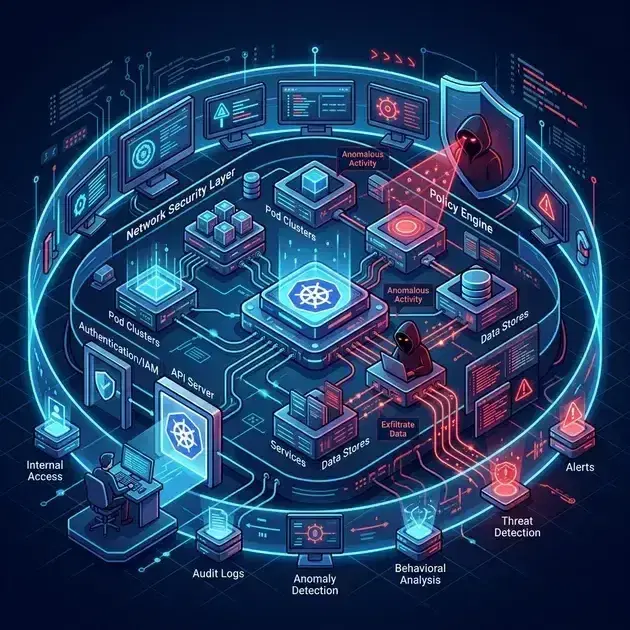
Security in Kubernetes is a multi-layer problem. A misconfigured API server allows anonymous access. Overly permissive RBAC lets a compromised service account access secrets across the cluster. A workload running as root can escape to the host node. An outdated container image with a known CVE is the entry point for lateral movement.
The CIS Kubernetes Benchmark (Center for Internet Security) codifies controls at each layer. Passing it isn't the goal — understanding what each control protects against helps you make informed decisions about where to invest hardening effort.
Layer 1: API Server Hardening
The API server is the single entry point for all Kubernetes control plane operations. Key flags:
1# kube-apiserver configuration (EKS: configured by AWS, but audit with kube-bench)
2--anonymous-auth=false              # Disable anonymous API access
3--audit-log-path=/var/log/audit.log # Enable audit logging
4--audit-log-maxage=30               # Retain 30 days of audit logs
5--audit-log-maxbackup=10
6--audit-log-maxsize=100
7--audit-policy-file=/etc/kubernetes/audit-policy.yaml
8--enable-admission-plugins=NodeRestriction,PodSecurity   # Enable admission controllers
9--profiling=false                   # Disable profiling endpoint (information exposure)
10--service-account-lookup=true       # Verify service account token exists before accepting it
11--tls-min-version=VersionTLS12
12--tls-cipher-suites=TLS_ECDHE_RSA_WITH_AES_128_GCM_SHA256,TLS_ECDHE_RSA_WITH_AES_256_GCM_SHA384,TLS_ECDHE_ECDSA_WITH_AES_128_GCM_SHA256
13# Note: TLS 1.3 ciphers (TLS_AES_*) are not configurable here — Go's TLS stack selects them automatically
Audit policy — control what gets logged without excessive volume:
1apiVersion: audit.k8s.io/v1
2kind: Policy
3rules:
4  # Log at RequestResponse level for sensitive operations
5  - level: RequestResponse
6    resources:
7      - group: ""
8        resources: ["secrets", "configmaps", "serviceaccounts/token"]
9  # Log at Metadata level for all other write operations
10  - level: Metadata
11    verbs: ["create", "update", "patch", "delete"]
12  # Don't log read operations on non-sensitive resources (reduces noise)
13  - level: None
14    verbs: ["get", "list", "watch"]
15    resources:
16      - group: ""
17        resources: ["pods", "services", "endpoints", "nodes"]
Layer 2: Kubelet Hardening
Each node's kubelet can be a pivot point if compromised. CIS-critical kubelet flags:
1# /etc/kubernetes/kubelet-config.yaml
2apiVersion: kubelet.config.k8s.io/v1beta1
3kind: KubeletConfiguration
4authentication:
5  anonymous:
6    enabled: false          # Disable unauthenticated kubelet API access
7  webhook:
8    enabled: true           # Use API server for authentication
9authorization:
10  mode: Webhook             # API server authorizes kubelet API requests (not AlwaysAllow)
11tlsCertFile: /etc/kubernetes/pki/kubelet.crt
12tlsPrivateKeyFile: /etc/kubernetes/pki/kubelet.key
13rotateCertificates: true    # Automatic certificate rotation
14readOnlyPort: 0             # Disable the unauthenticated read-only port (10255)
15protectKernelDefaults: true # Refuse to start if kernel parameters differ from expected values
16eventRecordQPS: 5
17streamingConnectionIdleTimeout: 4h
18makeIPTablesUtilChains: true
For EKS managed nodes, these are configured via the EKS-optimized AMI and managed node group launch templates. Use kube-bench to audit:
kubectl apply -f https://raw.githubusercontent.com/aquasecurity/kube-bench/main/job.yaml
kubectl logs job/kube-bench
Layer 3: Pod Security with PodSecurity Admission
PodSecurity Admission (stable since Kubernetes 1.25, replaced PodSecurityPolicy) enforces security profiles at the namespace level:
# Label namespaces with the desired security standard
kubectl label namespace production \
  pod-security.kubernetes.io/enforce=restricted \
  pod-security.kubernetes.io/enforce-version=latest \
  pod-security.kubernetes.io/warn=restricted \
  pod-security.kubernetes.io/audit=restricted
Three profiles:
privileged: No restrictions (use only for trusted infrastructure workloads)baseline: Prevents known privilege escalation (no hostNetwork, no privileged containers, restricted capabilities)restricted: Strictly hardened (must run as non-root, drop all capabilities, read-only root filesystem encouraged)
Most production application workloads should run under restricted. Infrastructure workloads (Falco, node exporters) may require privileged in a dedicated namespace.
Pod spec that meets the restricted standard:
1spec:
2  securityContext:
3    runAsNonRoot: true
4    runAsUser: 1000
5    fsGroup: 2000
6    seccompProfile:
7      type: RuntimeDefault    # Apply the container runtime's default seccomp profile
8  containers:
9    - name: api
10      securityContext:
11        allowPrivilegeEscalation: false
12        readOnlyRootFilesystem: true        # CIS-recommended but NOT required by PSS Restricted
13        capabilities:
14          drop: ["ALL"]       # Drop all Linux capabilities
15      volumeMounts:
16        - name: tmp
17          mountPath: /tmp     # ReadOnly root requires explicit writable volume for /tmp
18  volumes:
19    - name: tmp
20      emptyDir: {}
Server & SSH Hardening Checklist
The firewall, SSH, fail2ban, and update baseline every internet-facing Linux box should pass. Plain Markdown you can run down in an afternoon.
Free. Instant download. You'll also get the occasional deep-dive from the newsletter — unsubscribe anytime.
Layer 4: RBAC Least Privilege
Common RBAC anti-patterns that violate CIS benchmark:
1# ANTI-PATTERN: ClusterAdmin bound to a namespace ServiceAccount
2kubectl get clusterrolebindings -o json | jq -r '
3  .items[] |
4  select(.roleRef.name == "cluster-admin") |
5  [.metadata.name, (.subjects[]? | "\(.kind)/\(.name)")]|
6  @csv'
7
8# ANTI-PATTERN: ServiceAccounts with get/list Secrets at cluster scope
9kubectl get clusterrolebindings -o json | jq -r '
10  .items[] | ... | select(resources includes "secrets")'
Minimal RBAC for an application ServiceAccount:
1apiVersion: v1
2kind: ServiceAccount
3metadata:
4  name: payments-api
5  namespace: production
6  annotations:
7    eks.amazonaws.com/role-arn: arn:aws:iam::123456789:role/payments-api    # IAM for AWS
8automountServiceAccountToken: false    # Opt-out — only mount if the app needs K8s API access
9---
10apiVersion: rbac.authorization.k8s.io/v1
11kind: Role
12metadata:
13  name: payments-api
14  namespace: production
15rules:
16  # Only grant the minimum access the application actually needs
17  - apiGroups: [""]
18    resources: ["configmaps"]
19    resourceNames: ["payments-config"]    # Specific ConfigMap only, not all ConfigMaps
20 verbs: ["get"]# Audit what a ServiceAccount can do
kubectl auth can-i --list --as=system:serviceaccount:production:payments-apiLayer 5: Network Isolation
1# Default deny-all for a production namespace
2apiVersion: networking.k8s.io/v1
3kind: NetworkPolicy
4metadata:
5  name: default-deny-all
6  namespace: production
7spec:
8  podSelector: {}
9  policyTypes: [Ingress, Egress]
10---
11# Allow only necessary DNS egress
12apiVersion: networking.k8s.io/v1
13kind: NetworkPolicy
14metadata:
15  name: allow-dns
16  namespace: production
17spec:
18  podSelector: {}
19  egress:
20    - ports:
21        - port: 53
22          protocol: UDP
23        - port: 53
24          protocol: TCP
See Kubernetes NetworkPolicy Patterns for the full patterns with CNI enforcement details.
Layer 6: Image Supply Chain Security
Image scanning in CI:
1# GitHub Actions — scan with Trivy before push
2- name: Scan image for vulnerabilities
3  uses: aquasecurity/trivy-action@master
4  with:
5    image-ref: ${{ env.IMAGE_REF }}
6    format: sarif
7    exit-code: 1         # Fail CI on HIGH/CRITICAL CVEs
8    severity: HIGH,CRITICAL
9    ignore-unfixed: true  # Don't fail on CVEs with no fix available
Admission-time enforcement with Kyverno:
1apiVersion: kyverno.io/v1
2kind: ClusterPolicy
3metadata:
4  name: require-image-tag
5spec:
6  validationFailureAction: Enforce
7  rules:
8    - name: no-latest-tag
9      match:
10        any:
11          - resources:
12              kinds: ["Pod"]
13              namespaces: ["production"]
14      validate:
15        message: "Image tag 'latest' is not allowed in production."
16        pattern:
17          spec:
18            containers:
19              - image: "!*:latest"    # Reject any image tagged :latest
20    - name: require-image-digest
21      validate:
22        message: "Images must be referenced by digest (sha256:...) in production."
23        pattern:
24          spec:
25            containers:
26              - image: "*@sha256:*"   # Require digest-pinned images
Image signing with Cosign:
# Sign after push
cosign sign --key cosign.key 123456789.dkr.ecr.us-east-1.amazonaws.com/payments-api:1.4.2

# Verify signature
cosign verify --key cosign.pub 123456789.dkr.ecr.us-east-1.amazonaws.com/payments-api:1.4.2
Kyverno can enforce that only signed images are admitted to production namespaces.
Automated Benchmark Scanning
kube-bench (Aqua Security) scans a cluster against the CIS Kubernetes Benchmark:
kubectl apply -f https://raw.githubusercontent.com/aquasecurity/kube-bench/main/job.yaml
kubectl logs -f job/kube-bench
Falco provides runtime detection of CIS control violations at the syscall level — for how Falco detects privilege escalation, container escapes, and suspicious network activity, see Falco Runtime Security for Kubernetes.
See also
Frequently Asked Questions
What's the fastest path to CIS Level 1 compliance?
On EKS, AWS handles most control plane hardening. The highest-value actions for worker nodes and workloads:
- Enable PodSecurity admission with
restrictedprofile on production namespaces - Set
automountServiceAccountToken: falseon all ServiceAccounts that don't need API access - Apply default deny NetworkPolicy to all application namespaces
- Disable the kubelet read-only port via launch template
- Enable audit logging (CloudWatch Logs on EKS)
How do I handle workloads that legitimately need elevated privileges?
Use a dedicated namespace with a less restrictive PodSecurity profile and tight RBAC limiting who can deploy there. Combine with Falco runtime monitoring to detect if the elevated privilege is misused. Never grant privileged profile to the entire cluster.
For runtime threat detection that complements CIS hardening, see Falco Runtime Security for Kubernetes. For secrets management hardening (avoiding Kubernetes Secrets for sensitive data), see Secrets Management: Kubernetes Vault vs External Secrets Operator.
Hardening a Kubernetes cluster to meet compliance requirements? Talk to us at Coding Protocols — we help platform teams implement security controls that satisfy CIS, SOC 2, and PCI requirements without blocking development workflow.
Official References
- RBAC authorization — Role, ClusterRole and binding semantics
- Configure service accounts — token projection and the default service account
- Sigstore documentation — keyless signing, Rekor transparency and verification
- Trivy documentation — scanners, severity handling and SBOM output
Was this article helpful?
Be the first to rate this article
Related Topics
Found this useful? Share it.