Kubernetes StatefulSets and Persistent Storage: Patterns for Stateful Workloads

Quick answer
Running stateful workloads in Kubernetes — databases, message queues, caches — requires stable network identity, ordered deployment, and persistent volumes that survive pod restarts. StatefulSets provide the first two; StorageClasses and PersistentVolumeClaims handle the third. Together they make Kubernetes a viable home for workloads that traditionally required VMs.
- StatefulSet vs Deployment
- StatefulSet Anatomy
- StorageClass Configuration
- PersistentVolume Lifecycle
- StatefulSet Patterns
13 min read · Kubernetes
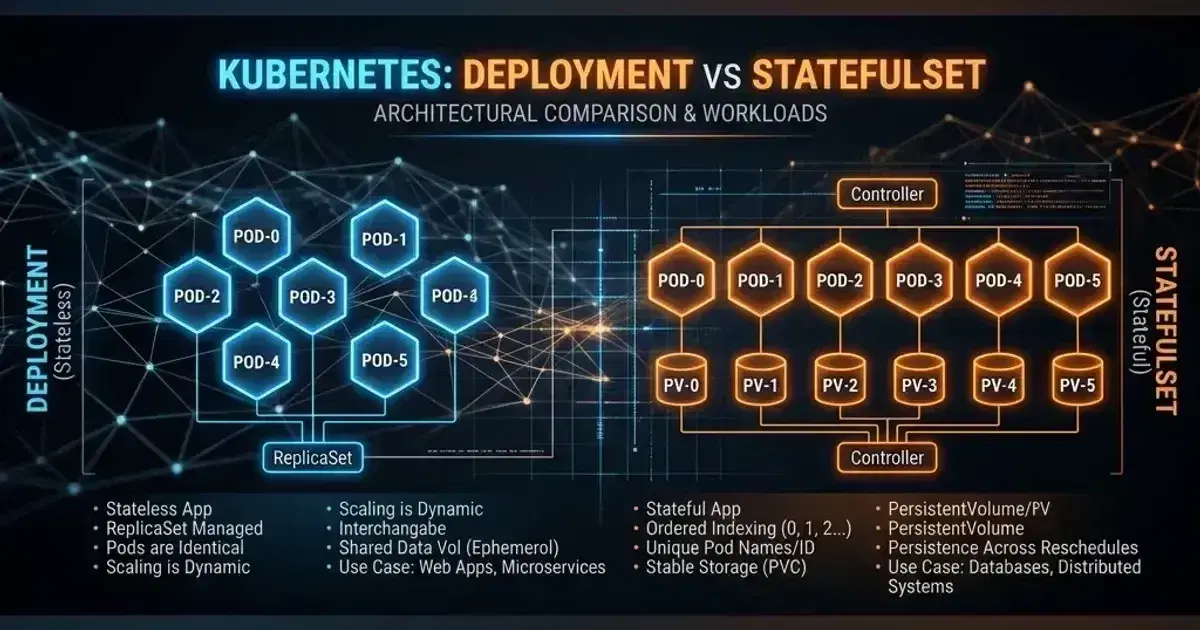
A Deployment's pods are interchangeable — they can be rescheduled to any node, given any IP, and restarted in any order. For stateless services, this is ideal. For a PostgreSQL primary, a Kafka broker, or a Redis cluster, it's a problem: each node has a specific role, stores its own data, and must be addressable by a stable hostname.
StatefulSet solves the identity problem. Persistent volumes solve the data problem. Understanding both — and how they interact with storage provisioners on EKS, GKE, or bare metal — is the foundation for running stateful workloads in Kubernetes.
StatefulSet vs Deployment
| Property | Deployment | StatefulSet |
|---|---|---|
| Pod name | pod-<random> | pod-0, pod-1, pod-2 (stable, ordinal) |
| DNS hostname | No stable hostname | pod-0.service-name.namespace.svc.cluster.local |
| Scaling order | Parallel | Serial (0→1→2 on scale-up; 2→1→0 on scale-down) |
| Volume binding | Shared PVC (unusual) or ephemeral | Separate PVC per pod (volumeClaimTemplate) |
| Rolling update | Parallel with maxUnavailable | Serial, from highest to lowest ordinal |
| Pod identity | Interchangeable | Each pod has unique, persistent identity |
The stable hostname matters for clustering protocols (Raft, Paxos, Kafka broker IDs) — a pod that rejoins after restart must connect to the same peer set using the same identity.
StatefulSet Anatomy
1apiVersion: apps/v1
2kind: StatefulSet
3metadata:
4  name: postgres
5  namespace: production
6spec:
7  serviceName: postgres    # Must match a Headless Service (clusterIP: None)
8  replicas: 3
9  selector:
10    matchLabels:
11      app: postgres
12
13  updateStrategy:
14    type: RollingUpdate
15    rollingUpdate:
16      partition: 0    # Only update pods with ordinal >= partition (canary: set to N-1)
17
18  podManagementPolicy: OrderedReady    # Default: serial. Use Parallel for independent pods.
19
20  template:
21    metadata:
22      labels:
23        app: postgres
24    spec:
25      terminationGracePeriodSeconds: 60    # Postgres needs time to flush WAL
26
27      containers:
28        - name: postgres
29          image: postgres:16
30          env:
31            - name: PGDATA
32              value: /data/pgdata
33          ports:
34            - containerPort: 5432
35              name: postgres
36          volumeMounts:
37            - name: data
38              mountPath: /data    # Mounts the PVC created by volumeClaimTemplates
39
40          resources:
41            requests:
42              cpu: 500m
43              memory: 1Gi
44            limits:
45              cpu: "2"
46              memory: 4Gi
47
48          readinessProbe:
49            exec:
50              command: ["pg_isready", "-U", "postgres"]
51            initialDelaySeconds: 10
52            periodSeconds: 10
53
54  # Each pod gets its own PVC — named data-postgres-0, data-postgres-1, etc.
55  volumeClaimTemplates:
56    - metadata:
57        name: data
58      spec:
59        accessModes: [ReadWriteOncePod]
60        storageClassName: gp3
61        resources:
62          requests:
63            storage: 100Gi
Headless Service
The Headless Service (clusterIP: None) is what enables stable DNS names for each pod:
1apiVersion: v1
2kind: Service
3metadata:
4  name: postgres
5  namespace: production
6spec:
7  clusterIP: None    # Headless — returns all pod IPs from DNS query
8  selector:
9    app: postgres
10  ports:
11    - port: 5432
12      name: postgres
With this Service, each pod is reachable at:
postgres-0.postgres.production.svc.cluster.localpostgres-1.postgres.production.svc.cluster.localpostgres-2.postgres.production.svc.cluster.local
A separate ClusterIP Service pointing to the primary (if using primary-replica replication managed externally or via a sidecar like Patroni) is used for read-write connections.
StorageClass Configuration
AWS EBS (gp3)
1apiVersion: storage.k8s.io/v1
2kind: StorageClass
3metadata:
4  name: gp3
5  annotations:
6    storageclass.kubernetes.io/is-default-class: "true"
7provisioner: ebs.csi.aws.com    # AWS EBS CSI Driver
8volumeBindingMode: WaitForFirstConsumer    # Create volume in same AZ as pod
9reclaimPolicy: Retain    # Don't delete volume when PVC is deleted (recommended for databases)
10allowVolumeExpansion: true
11parameters:
12  type: gp3
13  throughput: "200"    # MB/s (gp3 baseline: 125, max: 1000)
14  iops: "4000"         # IOPS (gp3 baseline: 3000, max: 16000)
15  encrypted: "true"
16  kmsKeyId: "arn:aws:kms:us-east-1:123456789:key/xxxx"    # Customer-managed KMS key
WaitForFirstConsumer is critical for EBS — EBS volumes are AZ-specific, so binding must wait until the pod is scheduled to know which AZ to create the volume in. With Immediate binding, volumes can be created in the wrong AZ and the pod will fail to start.
AWS EFS (for ReadWriteMany)
EBS volumes are ReadWriteOnce — one pod at a time. For shared storage (multiple pods reading/writing the same volume), use EFS:
1apiVersion: storage.k8s.io/v1
2kind: StorageClass
3metadata:
4  name: efs
5provisioner: efs.csi.aws.com
6parameters:
7  provisioningMode: efs-ap    # Access point per PVC (isolation per workload)
8  fileSystemId: fs-xxxxxxxx   # EFS filesystem ID
9  directoryPerms: "700"
10  basePath: "/efs"
11reclaimPolicy: Retain
12volumeBindingMode: Immediate    # EFS is multi-AZ, no need to wait
Use EFS for: machine learning model storage, shared config files, content management systems. Don't use EFS for: databases (performance characteristics are wrong for random I/O), high-throughput workloads.
Kubernetes Production Readiness Checklist
The pre-launch checks we run before calling a cluster production-ready — probes, resources, RBAC, upgrades, and backups. Plain Markdown you can commit to your repo.
Free. Instant download. You'll also get the occasional deep-dive from the newsletter — unsubscribe anytime.
PersistentVolume Lifecycle
StorageClass (defines provisioner + parameters)
    ↓
PVC created (by volumeClaimTemplate or directly)
    ↓
CSI provisioner creates the underlying storage (EBS volume, NFS mount)
    ↓
PV created and bound to PVC
    ↓
Pod mounts the PVC
    ↓
Pod deleted
    ↓
PVC remains (volumeClaimTemplate PVCs are not deleted with the StatefulSet pod)
    ↓
StatefulSet scaled down (pod-2 deleted)
    PVC data-postgres-2 persists — re-used if pod-2 comes back
Retain vs Delete Reclaim Policy
reclaimPolicy: Delete deletes the EBS volume when the PVC is deleted — fine for ephemeral test data, dangerous for production databases. Always use Retain for stateful workloads and manage volume lifecycle manually.
1# PVC for StatefulSet pods is not deleted automatically when the pod is deleted
2# You must delete PVCs manually:
3kubectl delete pvc data-postgres-2 -n production
4
5# With reclaimPolicy: Retain, the PV (and EBS volume) becomes "Released"
6# You must manually recycle or delete it:
7kubectl delete pv pvc-xxxx
8aws ec2 delete-volume --volume-id vol-xxxx
Expanding Volumes
With allowVolumeExpansion: true in the StorageClass:
kubectl patch pvc data-postgres-0 -n production \
  --type merge \
  --patch '{"spec": {"resources": {"requests": {"storage": "200Gi"}}}}'

# The CSI driver resizes the EBS volume
# The pod must be restarted to see the new size (filesystem resize happens on pod restart)
StatefulSet Patterns
Ordered Scaling with partition
partition in rollingUpdate enables canary updates for StatefulSets — update only pods with ordinal >= partition:
updateStrategy:
  type: RollingUpdate
  rollingUpdate:
    partition: 2    # Only update pod-2 (pod-0 and pod-1 stay on old version)
Validate pod-2 before setting partition: 0 to update all pods. This is the StatefulSet equivalent of Argo Rollouts canary for workloads that can't use it directly.
Anti-Affinity for Spread
Database replicas should not co-locate on the same node:
1affinity:
2  podAntiAffinity:
3    requiredDuringSchedulingIgnoredDuringExecution:
4      - labelSelector:
5          matchLabels:
6            app: postgres
7        topologyKey: kubernetes.io/hostname    # No two postgres pods on the same node
For AZ spread (required for true HA):
1affinity:
2  podAntiAffinity:
3    preferredDuringSchedulingIgnoredDuringExecution:
4      - weight: 100
5        podAffinityTerm:
6          labelSelector:
7            matchLabels:
8              app: postgres
9          topologyKey: topology.kubernetes.io/zone
Backup Patterns
Volume snapshots (CSI-native):
1apiVersion: snapshot.storage.k8s.io/v1
2kind: VolumeSnapshot
3metadata:
4  name: postgres-0-snapshot-2026-05-09
5  namespace: production
6spec:
7  volumeSnapshotClassName: csi-aws-vsc   # Requires EBS CSI driver installed with volumeSnapshotClass.create=true
8  source:
9    persistentVolumeClaimName: data-postgres-0
This creates an EBS snapshot. For consistent database backups, the application must be quiesced (or use PostgreSQL's pg_backup_start() + pg_backup_stop()) before snapshotting. Velero automates backup orchestration including application hooks.
Frequently Asked Questions
Should I run databases in Kubernetes?
For teams with Kubernetes expertise, running PostgreSQL, Redis, or Kafka in Kubernetes with proper StatefulSets, backup automation, and monitoring is operationally viable. For teams that prefer managed services, AWS RDS/ElastiCache/MSK eliminate the operational burden at the cost of tighter AWS coupling. The tradeoff is clear: managed services trade control for convenience. See Databases in Kubernetes: Smart Move or Unnecessary Risk? for the full analysis.
My StatefulSet pod is stuck in Pending — what's wrong?
1# Check if PVC is bound
2kubectl get pvc -n production
3
4# If PVC is Pending, check the events
5kubectl describe pvc data-postgres-0 -n production
6
7# Common causes:
8# - StorageClass not found or provisioner not running (check EBS CSI driver)
9# - Volume binding mode WaitForFirstConsumer: pod isn't scheduled yet
10# - Insufficient EBS quota in the AZ
11# - KMS key permission denied (check EBS CSI driver IAM role)
How do I resize a StatefulSet PVC without downtime?
For ReadWriteOnce EBS volumes: patch the PVC (as shown above), then perform a rolling restart — the filesystem resize happens when each pod restarts and mounts the newly sized volume. The StatefulSet handles the rolling restart automatically if you patch the PVC before updating the pod template.
For backup and disaster recovery of StatefulSet volumes and namespace resources with Velero, see Velero: Kubernetes Backup and Disaster Recovery. For the PodDisruptionBudget configuration that ensures StatefulSet availability during node drains, see Kubernetes PodDisruptionBudget and Graceful Shutdown Patterns.
Migrating stateful workloads into Kubernetes? Talk to us at Coding Protocols — we help platform teams design storage architectures that match workload I/O requirements and recovery objectives.
Official References
- StatefulSets — ordering guarantees, stable identities and update strategies
- StatefulSet basics — a walkthrough of scaling and rolling a stateful workload
Was this article helpful?
Be the first to rate this article
Related Topics
Found this useful? Share it.