Kubernetes Persistent Volumes: A Production Guide to PV, PVC, and StorageClass

Quick answer
Persistent volumes in Kubernetes look simple until you hit a zone mismatch, a stuck PVC, or a reclaim policy that deletes your data on pod deletion. Here's the complete production guide to PV, PVC, StorageClass, and the mistakes that cause data loss.
- The Three-Layer Model
- Access Modes
- Reclaim Policies
- Volume Binding Mode
- Dynamic Provisioning in Practice
14 min read · Kubernetes
Persistent storage in Kubernetes has three layers: PersistentVolume (the actual storage resource), PersistentVolumeClaim (a pod's request for storage), and StorageClass (the template for dynamic provisioning). Understanding how these fit together — and where they break — is essential for anyone running stateful workloads in Kubernetes.
This guide covers the mechanics, the production patterns, and the specific configurations that cause data loss if you get them wrong.
The Three-Layer Model
PersistentVolume (PV)
A PersistentVolume is a cluster-level resource representing a piece of storage. It exists independently of any pod. The PV describes where the storage lives (an EBS volume ID, an NFS path, an Azure Disk URI) and what its characteristics are (capacity, access mode, reclaim policy).
PVs can be created manually (static provisioning) or automatically by a CSI driver when a PVC is created (dynamic provisioning). In production, dynamic provisioning is almost always preferable — you don't manage individual volume IDs.
PersistentVolumeClaim (PVC)
A PersistentVolumeClaim is a namespace-scoped request for storage. A pod mounts a PVC; the PVC binds to a PV that satisfies its requirements. The binding is one-to-one — a PV bound to a PVC is not available to other PVCs.
StorageClass
A StorageClass defines how dynamic PVs are provisioned. It specifies the CSI driver (provisioner), the parameters (volume type, IOPS, encryption), the reclaim policy, and the volume binding mode.
1apiVersion: storage.k8s.io/v1
2kind: StorageClass
3metadata:
4  name: gp3-encrypted
5provisioner: ebs.csi.aws.com
6parameters:
7  type: gp3
8  iops: "3000"
9  throughput: "125"
10  encrypted: "true"
11reclaimPolicy: Retain        # Do not delete the volume when PVC is deleted
12volumeBindingMode: WaitForFirstConsumer  # Don't provision until a pod is scheduled
13allowVolumeExpansion: true
Access Modes
Access modes define how a volume can be mounted. The most common source of confusion:
| Mode | Abbreviation | Meaning |
|---|---|---|
ReadWriteOnce | RWO | Mounted read-write by a single node |
ReadOnlyMany | ROX | Mounted read-only by many nodes |
ReadWriteMany | RWX | Mounted read-write by many nodes |
ReadWriteOncePod | RWOP | Mounted read-write by a single pod (alpha in 1.22, beta in 1.27, stable/GA in 1.29) |
RWO is the default for block storage (EBS, Azure Disk, GCE PD). A ReadWriteOnce volume can only be attached to one node at a time. This means:
- A
Deploymentwith multiple replicas cannot share an RWO PVC across replicas — only one pod per node can mount it, and if your replicas land on different nodes, the second pod will fail to mount. - A
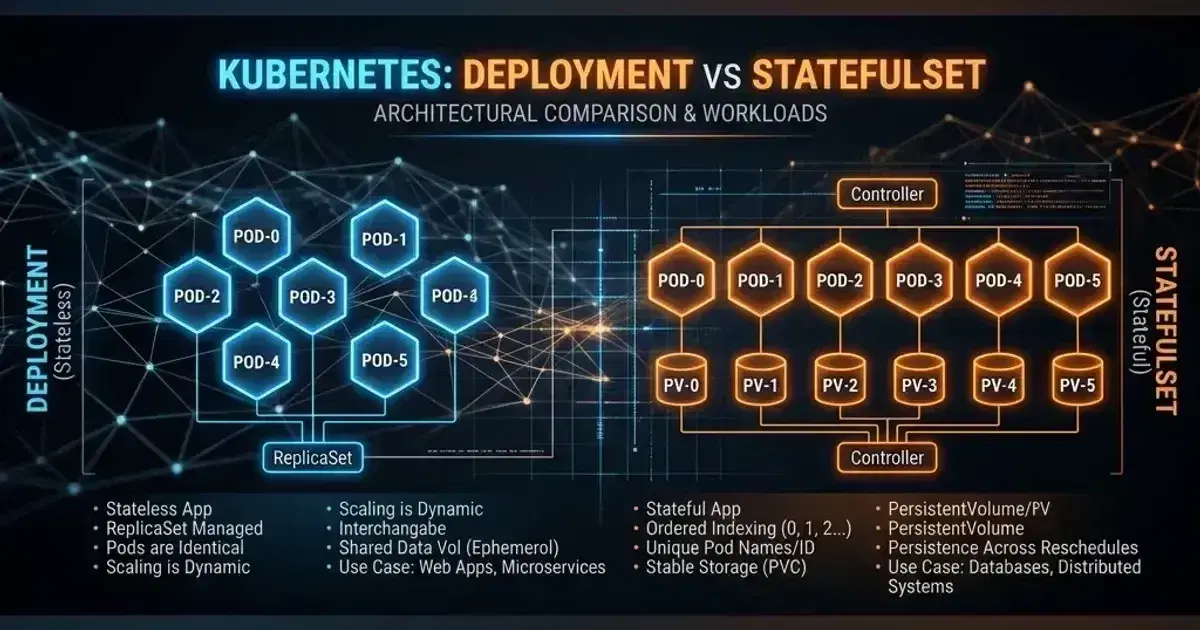
StatefulSetwith RWO volumes works correctly because each pod gets its own PVC viavolumeClaimTemplates.
RWX requires a distributed filesystem. EBS and Azure Disk do not support RWX — it's only available on NFS, EFS (AWS), Azure Files, and CephFS. If you need multiple pods to write to the same volume, you need a shared filesystem, not block storage.
ReadWriteOncePod is stricter than RWO — it ensures only one pod cluster-wide (not just one node) can mount the volume. Use this for databases where you want to guarantee no split-brain writes even if the pod is rescheduled.
Reclaim Policies
The reclaim policy determines what happens to the underlying storage when the PVC is deleted:
Delete — The PV and the underlying storage (EBS volume, Azure Disk, etc.) are deleted when the PVC is deleted. This is the default for dynamically provisioned volumes on most StorageClasses.
Retain — The PV is not deleted. The underlying storage persists. The PV moves to Released state and must be manually reclaimed or re-bound. Use Retain for production databases — you want the data to survive an accidental kubectl delete pvc.
Recycle — Deprecated. Don't use.
# Change reclaim policy on an existing PV
kubectl patch pv pvc-abc123 \
  -p '{"spec":{"persistentVolumeReclaimPolicy":"Retain"}}'
The data-loss misconfiguration: using Delete reclaim policy on a production database PVC, then running a cleanup script that deletes PVCs to "free resources." The database volume is gone. There's no recovery without a backup.
Set reclaimPolicy: Retain on any StorageClass used by production stateful workloads. Create a separate StorageClass with reclaimPolicy: Delete for development environments where cleanup is intentional.
Volume Binding Mode
volumeBindingMode controls when a PV is provisioned for a PVC:
Immediate — The PV is provisioned as soon as the PVC is created, before any pod is scheduled. Problem: the volume is provisioned in a random availability zone, which may not be the zone where the pod eventually schedules. The pod gets stuck in Pending with Multi-Attach error or volume node affinity conflict.
WaitForFirstConsumer — The PV is not provisioned until a pod claims the PVC and the scheduler has chosen a node. The volume is provisioned in the same AZ as the node. This is the correct setting for zonal block storage.
# Always use WaitForFirstConsumer for EBS, Azure Disk, GCE PD
volumeBindingMode: WaitForFirstConsumer
The symptom of Immediate on a zonal storage class: PVC is in zone us-east-1a but pod is scheduled to node in us-east-1b. The fix is to delete the PVC, update the StorageClass to WaitForFirstConsumer, and recreate.
Dynamic Provisioning in Practice
A complete example: stateful application with encrypted gp3 storage on EKS.
StorageClass:
1apiVersion: storage.k8s.io/v1
2kind: StorageClass
3metadata:
4  name: gp3-encrypted
5  annotations:
6    storageclass.kubernetes.io/is-default-class: "true"
7provisioner: ebs.csi.aws.com
8parameters:
9  type: gp3
10  encrypted: "true"
11  kmsKeyId: "arn:aws:kms:us-east-1:123456789:key/mrk-abc123"
12reclaimPolicy: Retain
13volumeBindingMode: WaitForFirstConsumer
14allowVolumeExpansion: true
StatefulSet with volumeClaimTemplates:
1apiVersion: apps/v1
2kind: StatefulSet
3metadata:
4  name: postgres
5  namespace: production
6spec:
7  serviceName: postgres
8  replicas: 1
9  selector:
10    matchLabels:
11      app: postgres
12  template:
13    metadata:
14      labels:
15        app: postgres
16    spec:
17      containers:
18        - name: postgres
19          image: postgres:16
20          env:
21            - name: PGDATA
22              value: /var/lib/postgresql/data/pgdata
23          volumeMounts:
24            - name: data
25              mountPath: /var/lib/postgresql/data
26  volumeClaimTemplates:
27    - metadata:
28        name: data
29      spec:
30        accessModes: ["ReadWriteOncePod"]
31        storageClassName: gp3-encrypted
32        resources:
33          requests:
34            storage: 100Gi
When the StatefulSet is created, Kubernetes creates a PVC named data-postgres-0. When the pod is scheduled to a node in us-east-1b, the EBS CSI driver provisions a gp3 volume in us-east-1b, encrypted with the specified KMS key, and binds it to the PVC.
Kubernetes Production Readiness Checklist
The pre-launch checks we run before calling a cluster production-ready — probes, resources, RBAC, upgrades, and backups. Plain Markdown you can commit to your repo.
Free. Instant download. You'll also get the occasional deep-dive from the newsletter — unsubscribe anytime.
Volume Expansion
Shrinking volumes is not supported in Kubernetes (or by most underlying storage backends). You can only expand.
Requirements for online expansion (without pod restart):
allowVolumeExpansion: truein the StorageClass- The CSI driver must support online expansion (EBS CSI does; older in-tree drivers may not)
- The filesystem must be extensible (ext4, xfs — yes; older filesystems — check)
# Expand a PVC from 100Gi to 200Gi
kubectl patch pvc data-postgres-0 -n production \
  -p '{"spec":{"resources":{"requests":{"storage":"200Gi"}}}}'
Watch the PVC status:
kubectl get pvc data-postgres-0 -n production -wThe PVC goes through Resizing → FileSystemResizePending → Bound with the new size. On EBS, the underlying volume is expanded online; the filesystem is resized the next time the pod is restarted (or immediately if online filesystem resize is supported).
Common Production Mistakes
Deleting a StatefulSet Without Handling PVCs
kubectl delete statefulset postgres -n productionThe StatefulSet is deleted. The pods are deleted. The PVCs are not deleted — by design. The data survives. But:
- If you immediately recreate the StatefulSet, it rebinds to the existing PVCs. This is correct behaviour and the reason PVCs are retained.
- If you're decommissioning the service, the PVCs continue to exist and the underlying volumes continue billing until you manually delete them.
Always check after deleting a StatefulSet:
kubectl get pvc -n production -l app=postgresDelete intentionally when decommissioning:
kubectl delete pvc -n production -l app=postgresNot Setting a Default StorageClass
If no default StorageClass is set and a PVC doesn't specify storageClassName, the PVC stays Pending indefinitely. This is a common "why is my pod not starting?" issue on new clusters.
# Check which StorageClass is default
kubectl get storageclass

# Set a default
kubectl patch storageclass gp3-encrypted \
  -p '{"metadata":{"annotations":{"storageclass.kubernetes.io/is-default-class":"true"}}}'
Snapshot Without Verifying Restore
Taking volume snapshots with VolumeSnapshot is not useful if you've never tested restoring from one. The snapshot may be incomplete, the snapshot class may be misconfigured, or the restore process may not work as expected.
Test your backup/restore path on non-production data before you need it in production.
1# Create a snapshot
2apiVersion: snapshot.storage.k8s.io/v1
3kind: VolumeSnapshot
4metadata:
5  name: postgres-backup-2026-05-09
6  namespace: production
7spec:
8  volumeSnapshotClassName: csi-aws-vsc
9  source:
10 persistentVolumeClaimName: data-postgres-01# Restore from snapshot
2apiVersion: v1
3kind: PersistentVolumeClaim
4metadata:
5 name: postgres-restored
6 namespace: production
7spec:
8 dataSource:
9 name: postgres-backup-2026-05-09
10 kind: VolumeSnapshot
11 apiGroup: snapshot.storage.k8s.io
12 accessModes: ["ReadWriteOncePod"]
13 storageClassName: gp3-encrypted
14 resources:
15 requests:
16 storage: 100GiUsing hostPath in Production
hostPath volumes mount a directory from the host node's filesystem into the pod. They work locally but break in production:
- If the pod is rescheduled to a different node, the data is gone
hostPathbypasses all storage policies and encryption- It's a container escape vector if the host path includes sensitive system directories
Use emptyDir for ephemeral scratch space, PVCs for persistent data.
CSI Drivers Reference
| Cloud | Block Storage | Shared Storage |
|---|---|---|
| AWS | ebs.csi.aws.com | efs.csi.aws.com |
| GCP | pd.csi.storage.gke.io | Filestore: filestore.csi.storage.gke.io |
| Azure | disk.csi.azure.com | Files: file.csi.azure.com |
| On-premise | Rook-Ceph: rook-ceph.rbd.csi.ceph.com | Ceph FS: rook-ceph.cephfs.csi.ceph.com |
Install CSI drivers as managed add-ons where available (EKS EBS CSI, GKE Persistent Disk CSI, AKS Disk CSI) rather than self-managed — managed drivers receive automatic updates and are tested against the cluster version.
Frequently Asked Questions
Can I move a PVC to a different namespace?
No. PVCs are namespace-scoped and cannot be moved. To migrate data to a different namespace: create a new PVC in the target namespace, copy data using a migration pod that mounts both PVCs, then delete the source PVC.
What happens if my node fails while a RWO volume is attached?
Kubernetes waits for the node to be confirmed unreachable before releasing the volume attachment (typically 5–6 minutes with default timeouts). Until the attachment is released, the pod cannot be rescheduled to a new node with the volume. This is a known StatefulSet failure scenario — for production databases, use a HA setup that doesn't depend on single-node volume attachment.
How do I back up a PVC that's in use?
Use volume snapshots (VolumeSnapshot). On EBS, snapshots are crash-consistent. For application-consistent backups (where the database has flushed writes), quiesce the application before snapshotting, or use a backup tool (Velero) that integrates with the application's backup hooks.
Should I use a StorageClass with Retain or Delete for development?
Delete for development — volumes should clean up automatically to avoid accumulating costs. Retain for staging and production — data should survive accidental PVC deletion. Use different StorageClass names (gp3-dev with Delete, gp3-prod with Retain) and enforce the correct class via Kyverno namespace policies.
For CSI driver configuration (EBS and EFS on EKS), StorageClass setup, and VolumeSnapshot support, see Kubernetes Storage: EBS and EFS CSI Drivers on EKS. For stateful workload patterns, see Kubernetes Deployment vs StatefulSet: When to Use Which. For backup and disaster recovery of PV data using Velero, see Velero: Kubernetes Backup and Disaster Recovery. For databases in Kubernetes specifically, see Databases in Kubernetes: Smart Move or Unnecessary Risk?.
For storage attached to StatefulSets specifically, see StatefulSet persistent storage; when a claim never binds at all, see unbound PersistentVolumeClaims.
Running stateful workloads in Kubernetes and hitting storage edge cases? Talk to us at Coding Protocols — we help platform teams design storage architectures that don't lose data under operational pressure.
Official References
- Persistent Volumes — access modes, reclaim policies, and binding behaviour
- ReadWriteOncePod reaches GA — the access mode's lifecycle and what it guarantees
- Storage Classes — provisioner parameters and volume binding modes
Was this article helpful?
Be the first to rate this article
Related Topics
Found this useful? Share it.