Podscape vs Lens vs k9s: A Kubernetes Management Tool Comparison
Quick answer
A detailed comparison of Kubernetes management tools: Podscape, Lens, and k9s. Understand the trade-offs between a desktop GUI, a TUI, and which tool best fits your workflow.
6 min read · Kubernetes
Managing Kubernetes clusters is complex. The ecosystem has responded with a range of tools — from terminal-based utilities to full desktop GUIs — each making different trade-offs around usability, power, and depth. This post compares three of the most prominent options: Podscape, Lens, and k9s.
Overview
| Podscape | Lens | k9s | |
|---|---|---|---|
| Type | Desktop GUI (Electron) | Desktop GUI (Electron) | Terminal UI (TUI) |
| License | Open source (Apache 2.0) | Freemium (Free for personal/small biz; Paid for large orgs) | Open source (Apache 2.0) |
| Target user | Developers + ops teams | Developers + ops teams | Power users, CLI-native engineers |
| Interface | React/web UI | React/web UI | Keyboard-driven TUI |
| Platforms | macOS, Windows, Linux | macOS, Windows, Linux | macOS, Windows, Linux |
Interface and User Experience
Podscape
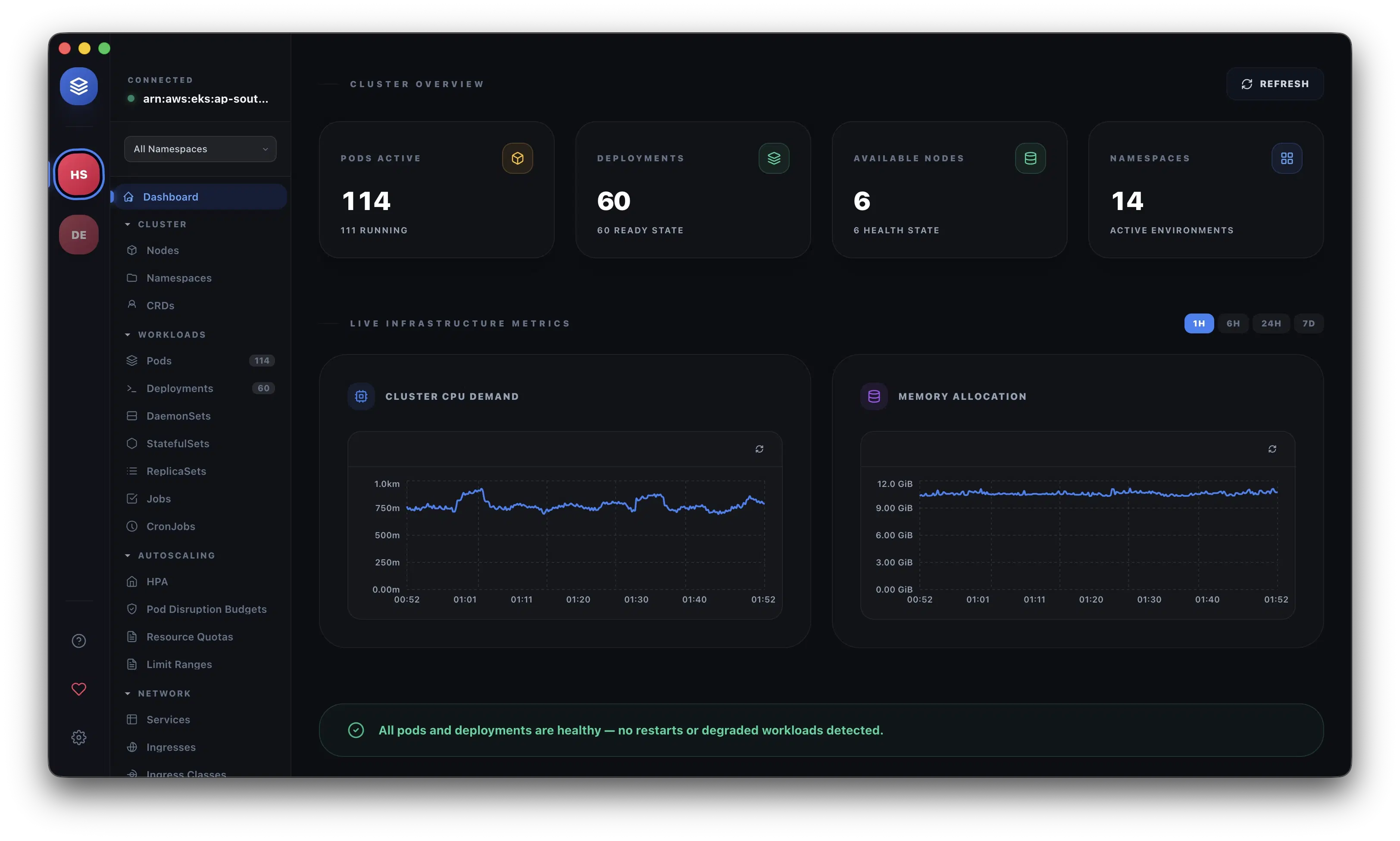
Podscape is a native desktop application built on Electron with a React frontend. The interface is organized around a sidebar that groups Kubernetes resources by category: Workloads, Networking, Config, Storage, RBAC, and Cluster. Navigation is point-and-click, with detail panels that open inline for each resource.
The UI is designed to surface contextual information without requiring users to memorize kubectl flags. Each resource kind gets a dedicated detail view — pods show log streaming and exec access per container, deployments expose replica scaling and rollout controls, HPAs display replica gauges and condition tables. A built-in security scanner (powered by Kubesec and Trivy) runs across workloads and reports issues directly in the interface.
Podscape includes a Network Map — an interactive topology visualization that renders the full resource dependency graph for a namespace, showing relationships between ingresses, services, pods, workloads, and network policies. This is a capability that neither Lens nor k9s offers out of the box.
Lens
Lens is the most established desktop Kubernetes GUI. Its interface follows a workbench metaphor: each cluster gets its own tab, and resources are browsed in a sidebar tree similar to an IDE. Lens renders rich detail views for most resource types and has strong support for multi-cluster workflows.
Lens's UI is polished and well-documented. It includes a built-in terminal, port-forward controls, Helm release management, and extension support. The paid Lens Platform tier adds team collaboration features, but the free Lens Desktop covers the core use cases well.
One notable aspect is the extension ecosystem — Lens has a marketplace of community-built extensions that add integrations with Prometheus, Grafana, cert-manager, and other tools.
k9s
k9s takes a fundamentally different approach: it is a terminal UI that runs inside any shell session. The interface is driven entirely by keyboard shortcuts. Users navigate by typing resource names, pressing / to filter, and using hotkeys to describe, edit, delete, exec into, or port-forward resources.
For engineers who live in the terminal, k9s is extremely fast to operate. There is no install friction beyond a single binary, and it works over SSH sessions, in CI environments, and anywhere a terminal is available. The trade-off is a steeper learning curve — proficiency requires internalizing the keybind vocabulary — and there is no graphical visualization.
Feature Comparison
Resource Coverage
All three tools support the standard set of Kubernetes resources. Podscape and Lens both include coverage for RBAC resources (Roles, ClusterRoles, RoleBindings, ClusterRoleBindings), network resources (NetworkPolicies, IngressClasses), and cluster-scoped resources like StorageClasses and PVs. k9s supports every resource the Kubernetes API exposes, including any CRD, since it queries the discovery API directly.
Podscape extends coverage with provider-aware sections: when Istio, Traefik v2/v3, or NGINX is detected on the cluster, the sidebar gains dedicated sections for those resources (VirtualServices, DestinationRules, IngressRoutes, etc.) without requiring any plugin installation.
Terminal and Exec
- Podscape includes a full tabbed terminal (PTY-backed, via
node-pty) with configurable shell, plus an in-context exec panel for running commands inside containers. - Lens includes an integrated terminal and exec support.
- k9s runs inside a terminal and can drop into exec sessions with a single key press. No separate terminal is needed.
Helm
- Podscape includes a Helm release browser showing installed releases, their chart versions, values, and revision history. Upgrades, rollbacks, and uninstalls are available from the UI. A repo browser allows browsing and installing charts from configured Helm repositories.
- Lens has a Helm section in the sidebar with release management and chart browser.
- k9s supports viewing Helm releases via
:helmand can describe manifests, but has no chart browser or guided upgrade flow.
Security Scanning
- Podscape has a built-in Security Hub that runs Kubesec and Trivy scans across all workloads. Results are surfaced per-resource with severity ratings and remediation guidance. Background scanning runs continuously and displays a progress pill in the corner.
- Lens does not include built-in security scanning; this is available through third-party extensions.
- k9s has no built-in security scanning.
Cost Visibility
- Podscape auto-detects Kubecost or OpenCost on the cluster and surfaces namespace-level cost allocation data natively.
- Lens supports cost integrations through extensions.
- k9s has no cost visibility features.
Network Topology
- Podscape renders a live interactive network map for the current namespace, showing the full resource graph (workloads, pods, services, ingresses, network policies, PVCs, nodes) with dependency edges. Supports both a structured grid view and a force-directed map layout.
- Lens has no built-in topology visualization.
- k9s has no topology visualization.
Multi-cluster Support
- Lens is the strongest here — each cluster appears as a tab, and switching between them is seamless. Team sharing of cluster configurations is a paid feature.
- Podscape supports multi-cluster via the kubeconfig context selector — switch between any context in your kubeconfig with a single click.
- k9s supports multiple kubeconfig contexts and can switch between them interactively.
Performance and Resource Usage
k9s is the lightest by a wide margin — it is a single Go binary with minimal memory overhead. Both Podscape and Lens are Electron apps, which means a higher baseline memory footprint (typically 200–400 MB). Podscape offloads all Kubernetes API work to a compiled Go sidecar process, which improves response latency for large clusters; the renderer stays snappy because the Go layer handles data aggregation and caching via shared informers.
Kubernetes Production Readiness Checklist
The pre-launch checks we run before calling a cluster production-ready — probes, resources, RBAC, upgrades, and backups. Plain Markdown you can commit to your repo.
Free. Instant download. You'll also get the occasional deep-dive from the newsletter — unsubscribe anytime.
Installation
k9s is the simplest:
brew install derailed/k9s/k9s
# or
curl -sS https://webinstall.dev/k9s | bash
Podscape ships as a signed native desktop app (DMG for macOS, NSIS installer for Windows, AppImage/deb for Linux). Download from the releases page and install like any desktop application.
Lens similarly ships as a signed desktop application via its download page.
When to Use Each Tool
Choose k9s if:
- You spend most of your day in the terminal.
- You need a tool that works over SSH or in headless environments.
- Low resource usage is a constraint.
- You're comfortable investing time to learn its keybind system.
Choose Lens if:
- Multi-cluster management across many contexts is a primary workflow.
- You want a large extension ecosystem with community integrations.
- Team sharing and collaboration features matter (paid tier).
Choose Podscape if:
- You want security scanning and cost visibility built in, without plugins.
- Network topology visualization would help your team understand cluster structure.
- You work with Istio, Traefik, or NGINX and want native support for those CRDs without configuration.
- You prefer a focused, all-in-one tool over a plugin-extensible platform.
Summary
| Feature | Podscape | Lens | k9s |
|---|---|---|---|
| GUI | Yes | Yes | No (TUI) |
| Multi-cluster | 1-click context switch | Yes (tabs) | Yes (interactive) |
| Helm browser | Yes | Yes | Limited |
| Built-in terminal | Yes | Yes | N/A |
| Exec into container | Yes | Yes | Yes |
| Network topology map | Yes | No | No |
| Built-in security scan | Yes | No (via extensions) | No |
| Cost visibility | Yes | No (via extensions) | No |
| Istio/Traefik/NGINX sections | Yes | No | No |
| Extension marketplace | Krew marketplace | Yes | Yes (plugins) |
| Resource footprint | Medium | Medium | Very low |
| Open source | Yes | Partially | Yes |
Conclusion
There is no universally "best" tool here — the right choice depends on your workflow and environment.
k9s is unmatched for speed and portability. It is the tool that many experienced platform engineers reach for when they need to move fast. Lens is the most mature GUI option with the broadest extension ecosystem and the best multi-cluster experience. Podscape distinguishes itself with capabilities that the others don't cover without plugins — security scanning, cost allocation, and network topology — making it a strong choice for teams that want those workflows integrated into their daily cluster management rather than bolted on separately.
All three are worth having installed. They complement each other well.
Frequently Asked Questions
Which should I choose?
Disclosure first: Podscape is built by Coding Protocols, who publish this post. All three are free to evaluate, so try them on your own clusters rather than deciding from any comparison, this one included — though check licensing before standardising: k9s is open source, Podscape is free for individuals, and Lens Personal is free for individual use with a revenue threshold above which commercial use requires a paid plan. k9s if you live in a terminal, a GUI if correlation across many resources is your bottleneck.
What does k9s do better than either GUI?
It starts instantly, uses very little memory, works over SSH on a bastion where a desktop application is not an option, and its keyboard navigation is genuinely faster once learned. If you already know it well, neither GUI will make you faster at what you already do quickly.
Do I still need to learn kubectl?
Yes. It is the interface every runbook, CI pipeline and support article assumes, and no GUI removes the need to understand what it is doing underneath. A visual tool is worth adding when correlation is the bottleneck — tracing ownership, watching many pods at once, or explaining a cluster to someone new.
Do these tools work with restricted RBAC?
All three surface only what your credentials permit, so a read-only account produces a read-only experience and cluster-scoped views appear empty. Evaluate with the role you will actually use rather than cluster-admin, or you will get a misleading impression of all three.
Was this article helpful?
Be the first to rate this article
Related Topics
Found this useful? Share it.