Kubernetes User Namespaces: How Rootless Isolation Actually Works
Quick answer
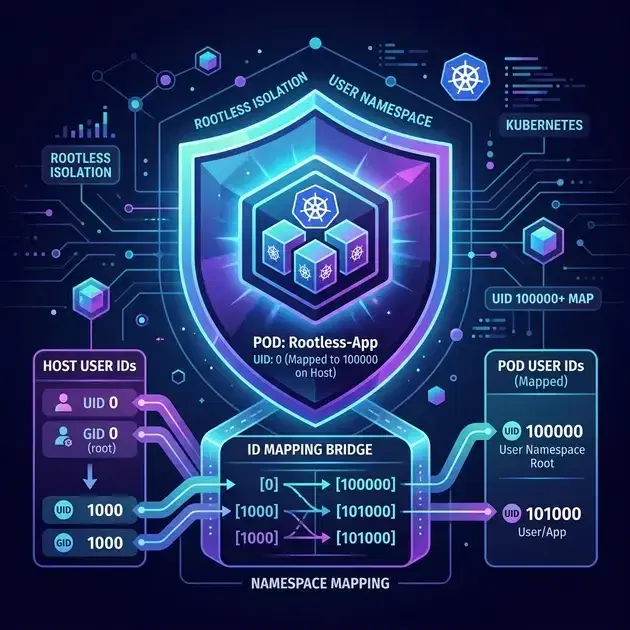
User namespaces map container UIDs to unprivileged host UIDs, so a process running as root inside a container runs as UID 100000 on the host. This post breaks down the kernel mechanics, what hostUsers: false changes in practice, and where the current limitations bite.
- What Are User Namespaces
- How the Kernel Does the Mapping
- What Changes When You Set hostUsers: false
- Limiting Host UID Ranges Using /etc/subuid
- Hands-On: See the Isolation
14 min read · Security
Most Kubernetes clusters run container processes as root. Not root-like — actual UID 0, the same identity that owns /etc/shadow and can load kernel modules on the host. The only thing separating that container process from full host root is the container runtime's use of other Linux namespaces (mount, network, pid) and seccomp profiles. If an attacker finds a kernel exploit or a container escape, they come out the other side as root on the node.
User namespaces fix this at the kernel level. A process running as UID 0 inside a user namespace can be mapped to UID 100000 on the host — an unprivileged account with no special access to anything. The container thinks it's root. The kernel knows it isn't.
Kubernetes made user namespace support generally available in 1.36, after a beta run that started in 1.30. Here's how it actually works.
What Are User Namespaces
Linux namespaces are the kernel mechanism that makes containers possible. There are seven namespace types: mount, UTS, IPC, network, PID, cgroup, and user. Most container runtimes create all of them except user namespaces, because user namespaces require more careful setup and have historically had a more complex security surface.
A user namespace is a complete remapping of UID and GID space. Inside the namespace, UIDs run from 0 to 65535 as normal. Outside the namespace, those same processes are identified by a different, configurable range of UIDs. The kernel maintains a translation table and applies it transparently on every syscall that touches user identity.
The critical security property: capabilities are scoped to the namespace. A process with CAP_SYS_ADMIN inside a user namespace has that capability within the namespace only. It cannot use it to load kernel modules on the host, mount arbitrary filesystems outside its namespace, or modify host network interfaces. The capability exists in a sandbox.
Without user namespaces, container root (CAP_SYS_ADMIN + UID 0) is host root. With user namespaces, container root is a remapped unprivileged user with namespace-scoped capabilities — a genuinely different security posture.
How the Kernel Does the Mapping
Every process has a user namespace. By default, processes inherit the initial user namespace — the one the kernel creates at boot, where UID 0 is actual root.
When a new user namespace is created (via clone(CLONE_NEWUSER) or unshare --user), the kernel allocates it a UID mapping table. This table is configured by writing to /proc/<pid>/uid_map and /proc/<pid>/gid_map. Each entry has three fields:
<start-inside> <start-outside> <count>
An entry of 0 100000 65536 means: UIDs 0 through 65535 inside this namespace correspond to UIDs 100000 through 165535 outside it. The mapping is linear — UID N inside maps to UID (100000 + N) outside.
You can see the mapping for any process:
# From inside a container with user namespaces:
cat /proc/self/uid_map
#        0     100000      65536

cat /proc/self/gid_map
#        0     100000      65536
The kernel applies this table on every identity-related syscall. When the container process calls getuid(), the kernel looks up UID 0 in the uid_map and returns 0 (the inside value) to the process. When a host process reads the container process's UID from /proc/<pid>/status, the kernel translates through the outside value — 100000.
# From the host, checking the same process:
ps aux | grep <container-process>
# USER       PID  ...
# 100000   12345  ...
The container process genuinely believes it is UID 0. The kernel presents a consistent illusion inside the namespace. Outside the namespace, the process is identified by its mapped UID.
What Capabilities Look Like Inside
Capabilities inside a user namespace are real capabilities — within the namespace. The kernel tracks two sets: effective capabilities (what the process can currently do) and the ambient capability set (what it inherits across exec). Both are scoped to the namespace where they were granted.
CAP_SYS_ADMIN inside a user namespace lets a process:
- Mount filesystems within its own namespace
- Modify its own namespace's network settings
- Perform other namespace-scoped privileged operations
It does not let the process:
- Load or unload kernel modules
- Access raw hardware
- Modify the host network namespace
- Write to host-mounted filesystems outside its own namespace
The kernel enforces this via namespace ownership checks. Every kernel resource has an associated namespace. A capability check succeeds only if the process's user namespace owns (or is an ancestor of) the resource's namespace. Host resources belong to the initial user namespace, which is not owned by a container's user namespace.
What Changes When You Set hostUsers: false
Before Kubernetes 1.25, user namespace support in Kubernetes was non-existent at the API level. Pods ran in the host user namespace by default, and there was no mechanism to opt out. The hostUsers field in the pod spec was added as alpha in 1.25 (stateless pods only). Support for pods with persistent volumes was added in 1.28 (still alpha). The full feature reached beta in 1.30 (off by default), was enabled by default while still beta in 1.33, and reached stable (GA) in Kubernetes 1.36.
Setting hostUsers: false in a pod spec:
1apiVersion: v1
2kind: Pod
3metadata:
4  name: isolated-pod
5spec:
6  hostUsers: false
7  containers:
8    - name: app
9      image: nginx:1.25
triggers the following:
The kubelet allocates a unique UID range for the pod from the node's /etc/subuid configuration. Every pod with hostUsers: false on a given node gets a distinct range of 65536 UIDs. Pod 1 might get UIDs 65536–131071, pod 2 gets 131072–196607, and so on. This allocation is stable across pod restarts on the same node.
The container runtime creates a new user namespace for the pod's containers. It writes the allocated range into the uid_map and gid_map files for the container processes.
All container processes run as mapped UIDs on the host. Container UID 0 becomes the first UID in the allocated range (e.g., 65536). Container UID 1000 becomes 65536 + 1000 = 66536 on the host.
Files on volumes mounted from the host appear with translated UIDs inside the container. A file owned by host UID 65536 appears as owned by UID 0 inside the container. A file owned by host UID 0 has no mapping into the container's namespace — it appears as owned by UID 65534 (nobody) inside.
CAP_SYS_ADMIN and other dangerous capabilities become namespace-scoped, as described above. A container that previously needed securityContext.capabilities.add: ["SYS_ADMIN"] with significant risk now gets that capability within a sandbox.
Verifying the Mapping in Practice
Deploy a pod with hostUsers: false:
1kubectl apply -f - <<EOF
2apiVersion: v1
3kind: Pod
4metadata:
5  name: userns-test
6spec:
7  hostUsers: false
8  containers:
9    - name: shell
10      image: busybox:1.36
11      command: ["sleep", "3600"]
12EOF
Check what the container thinks its UID is:
kubectl exec userns-test -- id
# uid=0(root) gid=0(root) groups=0(root),10(wheel)
The container sees root. Now check what the host sees:
1# Get the container's PID on the host
2CPID=$(kubectl get pod userns-test -o jsonpath='{.status.containerStatuses[0].state.running}' | \
3  xargs -I{} kubectl exec userns-test -- cat /proc/self/pid 2>/dev/null || \
4  crictl inspect $(crictl pods --name userns-test -q) | jq -r '.info.pid')
5
6# Check the UID mapping
7cat /proc/$CPID/uid_map
8#        0      65536      65536
9
10# Check the host UID
11ps -p $CPID -o user,pid,comm
12# USER     PID    COMM
13# 65536  12345   sleep
The container's UID 0 is host UID 65536. A container escape gives an attacker access as UID 65536 — an unprivileged account with no special host access.
Verify the mapping from inside the container:
kubectl exec userns-test -- cat /proc/self/uid_map
#        0      65536      65536

kubectl exec userns-test -- cat /proc/self/gid_map
#        0      65536      65536
Server & SSH Hardening Checklist
The firewall, SSH, fail2ban, and update baseline every internet-facing Linux box should pass. Plain Markdown you can run down in an afternoon.
Free. Instant download. You'll also get the occasional deep-dive from the newsletter — unsubscribe anytime.
Limiting Host UID Ranges Using /etc/subuid
The node's /etc/subuid file defines which UID ranges the kubelet can delegate to pods. Without a sufficient range configured here, the kubelet cannot allocate unique UID ranges to pods and will reject pods with hostUsers: false.
The file format is:
<user>:<start-uid>:<count>
For Kubernetes, the relevant user is root (since the kubelet runs as root):
cat /etc/subuid
# root:65536:524288
# containers:100000:65536
The entry root:65536:524288 gives the kubelet access to UIDs 65536 through 590823 — enough for 524288 / 65536 = 8 pods with user namespaces running concurrently on this node. Each pod consumes a range of 65536 UIDs.
To support more concurrent pods:
# Allow 128 pods: 128 × 65536 = 8,388,608 UIDs
echo "root:65536:8388608" >> /etc/subuid
echo "root:65536:8388608" >> /etc/subgid
The same range must appear in /etc/subgid for GID mapping.
The kubelet tracks which ranges are in use by storing pod UID range assignments in its state directory (/var/lib/kubelet/). When a pod is deleted, its range is returned to the pool. When the same pod is recreated on the same node, the kubelet reassigns the same range — this is important for persistent volumes, where file ownership must remain consistent across pod restarts.
Why Unique Ranges Per Pod Matter
If two pods shared the same UID range, a process in pod A running as UID 0 (mapped to host UID 65536) could potentially interact with host-level resources also owned by UID 65536 from pod B — breaking isolation between pods. Unique ranges ensure that even if two pods both think they're root, their host UIDs are completely disjoint and can't affect each other's resources.
Hands-On: See the Isolation
This example deploys two pods with user namespaces and verifies they get different host UIDs, then shows what a privileged escape looks like with and without user namespaces.
Two Pods, Two UID Ranges
1kubectl apply -f - <<EOF
2apiVersion: v1
3kind: Pod
4metadata:
5  name: userns-pod-a
6spec:
7  hostUsers: false
8  containers:
9    - name: shell
10      image: busybox:1.36
11      command: ["sleep", "3600"]
12---
13apiVersion: v1
14kind: Pod
15metadata:
16  name: userns-pod-b
17spec:
18  hostUsers: false
19  containers:
20    - name: shell
21      image: busybox:1.36
22      command: ["sleep", "3600"]
23EOF
Both containers think they're root:
kubectl exec userns-pod-a -- id
# uid=0(root) gid=0(root)

kubectl exec userns-pod-b -- id
# uid=0(root) gid=0(root)
But they have different UID mappings:
kubectl exec userns-pod-a -- cat /proc/self/uid_map
#        0      65536      65536

kubectl exec userns-pod-b -- cat /proc/self/uid_map
#        0     131072      65536
Pod A's root = host UID 65536. Pod B's root = host UID 131072. They cannot interact through any UID-based access control on the host.
Verifying Capability Scoping
Try a privileged operation that requires CAP_SYS_ADMIN inside the container — mounting a tmpfs:
# This works inside the user namespace (the capability is real within the namespace)
kubectl exec userns-pod-a -- sh -c "mkdir /tmp/mnt && mount -t tmpfs tmpfs /tmp/mnt && echo 'mounted'"
# mounted

# But the mount only exists inside the container's mount namespace — not visible on the host
The capability is effective within the container's namespace. On the host, the mount doesn't appear. This is the core value of user namespaces: privileged operations in a container are genuinely scoped.
Compare with a Pod in the Host User Namespace
1kubectl apply -f - <<EOF
2apiVersion: v1
3kind: Pod
4metadata:
5  name: host-userns-pod
6spec:
7  hostUsers: true   # or omit — true is the default
8  containers:
9    - name: shell
10      image: busybox:1.36
11      command: ["sleep", "3600"]
12EOF
13
14kubectl exec host-userns-pod -- cat /proc/self/uid_map
15#        0          0 4294967295
The mapping 0 0 4294967295 means the entire UID space is mapped 1:1. Container UID 0 is host UID 0. There is no remapping, no isolation. Root inside is root outside.
User Namespace Limitations
User namespaces are not a silver bullet. Several constraints narrow their applicability.
Kernel version requirement. Full user namespace support for Kubernetes pods with volumes requires Linux kernel 6.3+. This rules out many enterprise distributions: RHEL 9.x ships kernel 5.14, Ubuntu 22.04 LTS ships 5.15 (backports can reach 6.5), Debian 12 ships 6.1. Check your node kernel before deploying:
uname -r
# 6.8.0-55-generic   ← sufficient
# 5.15.0-100-generic ← insufficient for pods with volumes
For pods with no persistent volumes (or only emptyDir/configmap/secret), kernel 5.19 is sufficient on some configurations.
Stateful workloads need careful file ownership. When a pod with hostUsers: false writes to a PersistentVolumeClaim, files are created with the mapped host UID (e.g., UID 65536). If the pod is rescheduled to a different node, the kubelet will assign the same UID range for the same pod — but only if the pod is recreated with the same UID (which Kubernetes guarantees by storing the mapping). New pods with different names will get different ranges and will see the old files as owned by an unknown UID.
hostNetwork, hostPID, hostIPC must be false. You cannot mix host namespace access with user namespace isolation — they are mutually exclusive in the pod spec. Enabling any of hostNetwork: true, hostPID: true, or hostIPC: true prevents hostUsers: false from being applied.
Container runtime support is required. The CRI implementation must support user namespaces:
- containerd: 2.0+ (containerd 1.7 had experimental support for K8s 1.25–1.26 only; the redesign in 1.27 requires 2.0+)
- CRI-O: 1.25+
- runc: 1.2+ or crun: 1.9+ (OCI runtime layer)
Older runtimes silently ignore hostUsers: false or reject the pod. Verify runtime version before relying on this feature.
Some syscalls behave differently. Certain syscalls check the calling process's UID against the initial user namespace rather than the current one. Operations on /proc entries for processes in different namespaces, some perf-related syscalls, and a handful of networking operations behave differently inside a user namespace. Applications that make unusual syscalls may break.
Windows nodes don't support user namespaces. This is a Linux-only feature. Pods scheduled on Windows nodes must use hostUsers: true (the default).
/proc/sys/kernel/unprivileged_userns_clone on some distributions. Debian and some Ubuntu configurations set this to 0, disabling user namespace creation for unprivileged processes. On these systems, you need to set it to 1:
# Temporary
echo 1 > /proc/sys/kernel/unprivileged_userns_clone

# Permanent
echo "kernel.unprivileged_userns_clone = 1" > /etc/sysctl.d/99-user-namespaces.conf
sysctl --system
Note: this setting is irrelevant when the kubelet (running as root) creates user namespaces — root is always allowed to create user namespaces. It matters if you're testing user namespace creation as an unprivileged user.
Where This Fits in a Defense-in-Depth Model
User namespaces are one layer. They don't replace seccomp profiles, AppArmor/SELinux policies, or network policies — they make those layers more effective by reducing the blast radius of a container escape. See Kubernetes security hardening: CIS Benchmark and defense-in-depth for how this layer fits alongside the rest.
The threat model user namespaces address is specifically: a container escape that gives the attacker the container's UID on the host. Without user namespaces, that UID is 0 and the attacker has full root access. With user namespaces, that UID is an unprivileged account that can't read /etc/shadow, can't modify kernel state, and can't access other pods' filesystems.
For new clusters on kernel 6.3+, setting hostUsers: false as the default in your OPA Gatekeeper or Kyverno policies is a low-friction win. The feature is stable, the overhead is minimal, and the isolation improvement is real. For existing clusters on older kernels, track the kernel upgrade path — user namespaces are one of the better security improvements in recent Kubernetes releases.
Further Reading
- KEP-127: Support User Namespaces — the Kubernetes Enhancement Proposal with full design rationale
- user_namespaces(7) man page — the authoritative Linux reference for UID mapping mechanics
- Kubernetes User Namespaces Documentation — official docs with current configuration requirements
- Linux Namespace Security — kernel documentation on how credentials interact with namespaces
Frequently Asked Questions
What Kubernetes version do I need for user namespaces?
User namespace support (hostUsers: false) went beta in Kubernetes 1.30, became on by default in 1.33, and reached stable (GA) in 1.36. You also need a runtime that supports it — containerd 2.0+ or CRI-O 1.25+ — and a kernel of at least 6.3 for the idmapped-mount support that makes volumes work cleanly.
Do user namespaces replace runAsNonRoot and the other securityContext controls?
No — they complement them. User namespaces change what UID 0 means (root in the pod maps to an unprivileged host UID), which blunts container-escape impact. You should still set runAsNonRoot, drop capabilities, and apply seccomp profiles: defense in depth assumes any single layer can fail.
Can I use user namespaces with every workload?
Not yet. Pods that need to share the host user namespace — anything with hostNetwork, hostPID, or hostIPC, and some device-plugin or privileged DaemonSet patterns — can't set hostUsers: false. Check your runtime and storage drivers too: most CSI volumes work via idmapped mounts on modern kernels, but verify before rolling it out fleet-wide.
Official References
- User namespaces — the feature page, including its current stability level
- Use a user namespace with a Pod — the hostUsers walkthrough and runtime requirements
Was this article helpful?
Be the first to rate this article
Related Topics
Found this useful? Share it.