Kubernetes Multi-Tenancy: Namespace Isolation, Capsule, and vcluster
Quick answer
Sharing a Kubernetes cluster across teams requires boundaries — resource quotas so one team can't exhaust the cluster, network policies so teams can't see each other's traffic, RBAC so teams can only manage their own workloads. There are three main approaches to Kubernetes multi-tenancy, each with different isolation guarantees and operational complexity.
- Approach 1: Namespace-Based Isolation
- Approach 2: Capsule (Soft Multi-Tenancy with a Policy Engine)
- Approach 3: vcluster (Virtual Clusters)
- Choosing the Right Approach
- Platform Automation with Kyverno
14 min read · Kubernetes
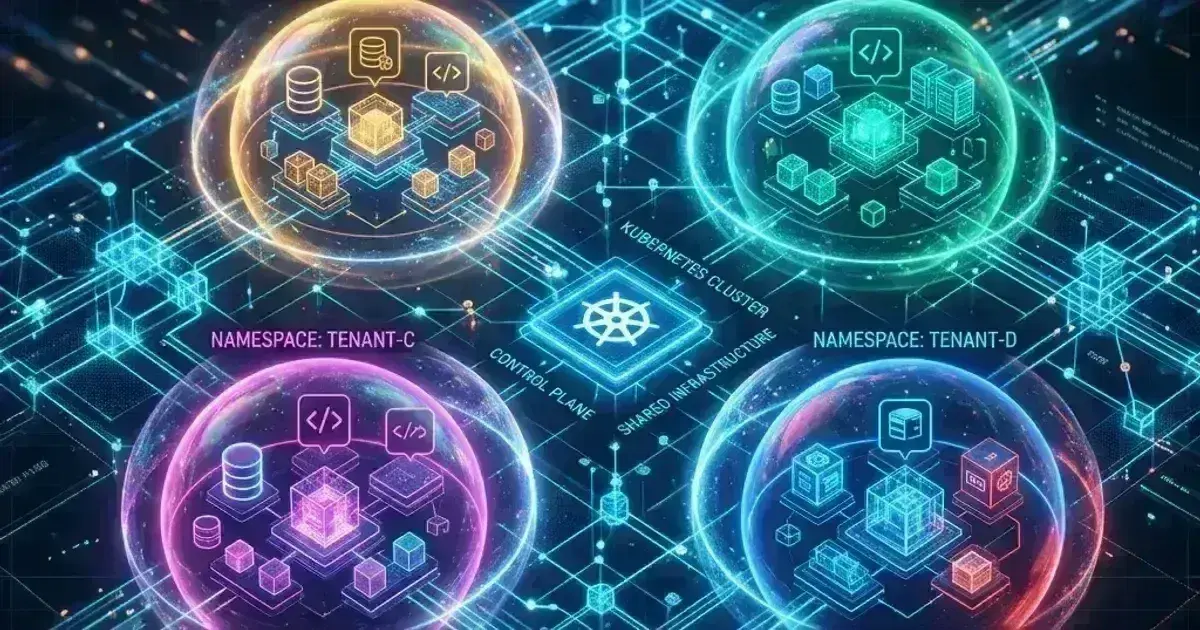
When multiple teams share a Kubernetes cluster, the platform team faces a fundamental question: how isolated do different tenants need to be from each other? The answer determines your multi-tenancy architecture.
At one extreme, teams share everything — same API server, same nodes, same network, separated only by namespace conventions and RBAC. This is soft multi-tenancy: convenient, cost-efficient, but with real risks if misconfigured. At the other extreme, each tenant gets a dedicated physical cluster — maximum isolation, but high cost and operational overhead. Virtual clusters (vcluster) occupy the middle ground: each tenant gets their own Kubernetes API server running as workloads in a shared physical cluster.
Approach 1: Namespace-Based Isolation
The most common approach. Each tenant gets one or more namespaces with enforced boundaries:
Team A: namespace/team-a-production, namespace/team-a-staging
Team B: namespace/team-b-production, namespace/team-b-staging
Platform: namespace/kube-system, namespace/monitoring, namespace/cert-manager
Required controls for each tenant namespace:
- RBAC — tenant admins can only manage their namespaces
- ResourceQuota — prevent a tenant from exhausting cluster resources
- LimitRange — enforce default resource requests/limits
- NetworkPolicy — default deny, allow only necessary traffic
- PodSecurity admission — enforce baseline or restricted
1# Automated namespace provisioning script (or Kyverno ClusterPolicy)
2kubectl create namespace team-payments-production
3
4# Apply all controls
5kubectl apply -f - <<EOF
6apiVersion: v1
7kind: ResourceQuota
8metadata:
9  name: default-quota
10  namespace: team-payments-production
11spec:
12  hard:
13    requests.cpu: "10"
14    requests.memory: 20Gi
15    limits.cpu: "20"
16    limits.memory: 40Gi
17    pods: "50"
18---
19apiVersion: v1
20kind: LimitRange
21metadata:
22  name: default-limits
23  namespace: team-payments-production
24spec:
25  limits:
26    - type: Container
27      defaultRequest:
28        cpu: 100m
29        memory: 128Mi
30      default:
31        cpu: 200m
32        memory: 256Mi
33      max:
34        cpu: "4"
35        memory: 4Gi
36---
37apiVersion: networking.k8s.io/v1
38kind: NetworkPolicy
39metadata:
40  name: default-deny-all
41  namespace: team-payments-production
42spec:
43  podSelector: {}
44  policyTypes:
45    - Ingress
46    - Egress
47EOF
Limitations of namespace-based isolation:
- Cluster-scoped resources (CRDs, ClusterRoles, ClusterRoleBindings, PersistentVolumes, StorageClasses) are shared — a tenant can't install their own CRDs
- Node-level isolation is impossible — pods from different tenants run on the same nodes
- A kernel vulnerability or container escape affects all tenants on a node
- Tenants can't modify admission controllers or API server configuration
For teams where these limitations matter (different SLAs, different security requirements, untrusted code), soft multi-tenancy is insufficient.
Approach 2: Capsule (Soft Multi-Tenancy with a Policy Engine)
Capsule extends namespace-based isolation with a Tenant custom resource that groups namespaces, enforces policies, and gives tenant users limited self-service — including the ability to create their own namespaces, within platform-defined limits.
1apiVersion: capsule.clastix.io/v1beta2
2kind: Tenant
3metadata:
4  name: payments-team
5spec:
6  owners:
7    - kind: User
8      name: [email protected]    # Tenant owner — can manage tenant namespaces
9    - kind: Group
10      name: payments-engineers    # Group members can manage tenant namespaces
11
12  namespaceOptions:
13    quota: 5                      # Max namespaces this tenant can create
14    additionalMetadata:           # Automatically add labels to tenant namespaces
15      labels:
16        tenant: payments
17        cost-center: cc-123
18
19  limitRanges:
20    items:
21      - limits:
22          - type: Container
23            defaultRequest:
24              cpu: 100m
25              memory: 128Mi
26            default:
27              cpu: 200m
28              memory: 256Mi
29
30  resourceQuotas:
31    items:
32      - hard:
33          requests.cpu: "20"
34          requests.memory: 40Gi
35          pods: "100"
36    scope: Tenant   # Aggregate quota across all tenant namespaces — requires Capsule v0.4.x+ (v1beta2 API)
37
38  networkPolicies:
39    items:
40      - policyTypes:
41          - Ingress
42          - Egress
43        podSelector: {}        # Default deny all — applied automatically to every tenant namespace
44    # Tenant network policies are merged with platform-defined NetworkPolicy objects
45
46  ingressOptions:
47    allowedHostnames:
48      allowedRegex: "^.*\\.payments\\.example\\.com$"   # Tenant can only use .payments.example.com hostnames
49
50  storageClasses:
51    allowed:
52      - gp3
53    allowedRegex: ".*"
54
55  imagePullPolicies:
56    - Always
57    - IfNotPresent
58
59  priorityClasses:
60    allowed:
61      - default
62      - high-priority
63
64  podOptions:
65    additionalMetadata:
66      annotations:
67        cost-center: cc-123    # Automatically annotate all pods for cost attribution
With Capsule, alice can create a namespace in her tenant (up to the quota) without platform team involvement — but the platform controls which namespaces she can use, what resources she can consume, which ingress hostnames she can claim, and what storage classes she can provision.
Capsule also prevents tenant users from accessing other tenants' resources — if Alice tries kubectl get pods --all-namespaces, Capsule restricts the response to only her tenant's namespaces.
Approach 3: vcluster (Virtual Clusters)
vcluster (by Loft Labs, open-source) creates virtual Kubernetes clusters that run as regular workloads inside the host cluster. Each virtual cluster has:
- Its own Kubernetes API server (running as a StatefulSet/Deployment)
- Its own etcd (or SQLite for lightweight setups)
- Its own virtual namespaces, RBAC, CRDs, and admission webhooks
- Actual pod execution on the host cluster's nodes (the vcluster syncs pods downward)
1# Install the vcluster CLI
2curl -L -o vcluster "https://github.com/loft-sh/vcluster/releases/latest/download/vcluster-linux-amd64"
3chmod +x vcluster && mv vcluster /usr/local/bin/vcluster
4
5# Create a virtual cluster for the payments team
6vcluster create payments-cluster \
7  --namespace team-payments \
8  --connect=false \
9  --values vcluster-values.yaml
10
11# Connect to the virtual cluster
12vcluster connect payments-cluster --namespace team-payments
13# Creates a kubeconfig pointing to the virtual cluster API server1# vcluster-values.yaml
2controlPlane:
3 distro:
4 k3s:
5 enabled: true # k3s as the virtual API server (lightweight)
6 statefulSet:
7 resources:
8 requests:
9 cpu: 200m
10 memory: 256Mi
11 limits:
12 cpu: "1"
13 memory: 1Gi
14
15# Sync objects from virtual → host cluster
16sync:
17 toHost:
18 pods:
19 enabled: true
20 services:
21 enabled: true
22 persistentVolumeClaims:
23 enabled: true
24 fromHost:
25 ingressClasses:
26 enabled: true
27 storageClasses:
28 enabled: true
29To enforce resource bounds on the host namespace that vcluster runs in, apply ResourceQuota and LimitRange directly to the host namespace — these constrain the aggregate resources consumed by all synced pods:
1# Apply to the host namespace (e.g., team-payments)
2apiVersion: v1
3kind: ResourceQuota
4metadata:
5  name: vcluster-tenant-quota
6  namespace: team-payments
7spec:
8  hard:
9    requests.cpu: "10"
10    requests.memory: 20Gi
11    pods: "50"
12---
13apiVersion: v1
14kind: LimitRange
15metadata:
16  name: vcluster-tenant-limits
17  namespace: team-payments
18spec:
19  limits:
20    - type: Container
21      default:
22        cpu: 200m
23        memory: 256Mi
24      defaultRequest:
25        cpu: 100m
26        memory: 128Mi
What virtual clusters enable that namespace isolation can't:
- Tenant-installed CRDs: The payments team can install their own CRDs (e.g., a custom
PaymentOrderCRD) without affecting the host cluster - Tenant admission webhooks: Each virtual cluster can have its own Kyverno, OPA Gatekeeper, or custom webhooks
- Different Kubernetes versions: A virtual cluster can run a different API version than the host
- Full RBAC isolation: ClusterAdmin in the virtual cluster can't touch host cluster resources
What virtual clusters don't provide:
- Node-level isolation — pods still run on shared host nodes
- Kernel-level isolation — a container escape affects the host node
- Different hardware profiles per virtual cluster (unless combined with node taints)
For workloads that need true node isolation (regulated industries, untrusted tenants), physical cluster separation remains necessary.
Kubernetes Production Readiness Checklist
The pre-launch checks we run before calling a cluster production-ready — probes, resources, RBAC, upgrades, and backups. Plain Markdown you can commit to your repo.
Free. Instant download. You'll also get the occasional deep-dive from the newsletter — unsubscribe anytime.
Choosing the Right Approach
| Requirement | Namespace | Capsule | vcluster | Physical cluster |
|---|---|---|---|---|
| Cost | Lowest | Low | Low-medium | Highest |
| Operational overhead | Low | Medium | Medium | High |
| CRD isolation | No | No | Yes | Yes |
| Node isolation | No | No | No | Yes |
| Tenant self-service | Limited | Good | Full | Full |
| Different K8s versions | No | No | Yes | Yes |
| Custom admission control | No | Partial | Yes | Yes |
Decision guide:
- Internal teams, similar trust level, simple apps: Namespace isolation with Capsule
- Teams needing CRDs or different admission control: vcluster
- Regulated workloads, compliance requirements, untrusted tenants: Physical cluster per tenant (or vcluster on dedicated nodes)
- SaaS product with customer-facing K8s: vcluster, or physical cluster per large customer
Platform Automation with Kyverno
Regardless of the approach, automate tenant provisioning with Kyverno policies that generate required resources when a namespace is created:
1apiVersion: kyverno.io/v1
2kind: ClusterPolicy
3metadata:
4  name: provision-tenant-namespace
5spec:
6  rules:
7    - name: generate-network-policy
8      match:
9        any:
10          - resources:
11              kinds: [Namespace]
12              selector:
13                matchLabels:
14                  managed-by: platform
15      generate:
16        apiVersion: networking.k8s.io/v1
17        kind: NetworkPolicy
18        name: default-deny-all
19        namespace: "{{request.object.metadata.name}}"
20        synchronize: true
21        data:
22          spec:
23            podSelector: {}
24            policyTypes:
25              - Ingress
26              - Egress
27    - name: generate-resource-quota
28      match:
29        any:
30          - resources:
31              kinds: [Namespace]
32              selector:
33                matchLabels:
34                  managed-by: platform
35      generate:
36        apiVersion: v1
37        kind: ResourceQuota
38        name: default-quota
39        namespace: "{{request.object.metadata.name}}"
40        synchronize: true
41        data:
42          spec:
43            hard:
44              requests.cpu: "{{request.object.metadata.annotations.\"platform.example.com/cpu-quota\" || '5'}}"
45              requests.memory: "{{request.object.metadata.annotations.\"platform.example.com/memory-quota\" || '10Gi'}}"
46              pods: "50"
Platform teams label namespaces with managed-by: platform; Kyverno generates all required controls automatically and keeps them in sync.
Frequently Asked Questions
How do I prevent a tenant from using cluster-admin through a ClusterRoleBinding?
RBAC doesn't prevent a tenant from creating ClusterRoleBindings — that requires either removing the create verb on clusterrolebindings from the tenant's Role, or using a policy engine. Kyverno:
1- rule: restrict-clusterrolebinding
2  match:
3    any:
4      - resources:
5          kinds: [ClusterRoleBinding]
6  validate:
7    message: "ClusterRoleBindings with cluster-admin are not allowed for tenant users"
8    deny:
9      conditions:
10        all:
11          - key: "{{ request.object.roleRef.name }}"
12            operator: Equals
13            value: cluster-admin
14          - key: "{{ request.userInfo.groups }}"
15            operator: AnyNotIn
16            value: ["system:masters", "platform-admins"]
Can vcluster tenants install operators?
Yes — operators in a virtual cluster run in the virtual cluster's namespace in the host, and their CRDs exist only in the virtual cluster's API server. From the host's perspective, it's just pods and services. The operator's controller runs and watches the virtual cluster's API (via the syncer); CRDs are only present in the virtual cluster's etcd. This is one of vcluster's key value propositions for platform teams.
What about PodSecurity admission in a multi-tenant cluster?
Apply Pod Security Standards at the namespace level with labels. For tenant namespaces, enforce at least baseline to prevent privileged containers and host path mounts:
kubectl label namespace team-payments-production \
  pod-security.kubernetes.io/enforce=baseline \
  pod-security.kubernetes.io/warn=restricted \
  pod-security.kubernetes.io/audit=restricted
For the most sensitive tenants (fintech, healthcare), enforce restricted. For teams running legacy workloads that need baseline, apply it but audit towards restricted. See Kubernetes Security Hardening for a complete PSA configuration guide.
Automating Namespace Provisioning with GitHub Actions
For self-service namespace provisioning at scale, use a GitHub Actions workflow triggered by a PR to the platform config repo. Teams submit a PR adding their namespace directory; the platform team reviews and merges; the apply job runs on merge.
1# .github/workflows/provision-namespace.yml
2name: Provision Namespace
3on:
4  pull_request:
5    paths: ["namespaces/**"]
6    types: [opened, synchronize]
7
8jobs:
9  validate:
10    runs-on: ubuntu-latest
11    steps:
12      - uses: actions/checkout@v4
13      - name: Validate namespace config
14        run: |
15          # Check namespace name follows convention
16          # Check quota values are within approved limits
17          # Check RBAC subjects are valid SSO groups
18          ./scripts/validate-namespace.sh
19
20  apply:
21    if: github.event_name == 'push' && github.ref == 'refs/heads/main'
22    runs-on: ubuntu-latest
23    steps:
24      - uses: actions/checkout@v4
25      - name: Apply namespace
26        run: |
27          kubectl kustomize namespaces/$NAMESPACE_NAME | kubectl apply -f -
The validation job runs on every PR, catching configuration errors before merge. The apply job runs on merge to main only — the PR review gates the actual provisioning. Teams submit a PR adding their namespace directory to namespaces/; the platform team reviews the quota requests, RBAC subjects, and naming conventions before approving.
This pattern fits naturally into a GitOps workflow: the namespaces/ directory is the source of truth for all provisioned namespaces, diffs are reviewable before apply, and the apply job can be extended to run kubectl diff first for a preview step.
For namespace fundamentals, resource quotas, LimitRange, and per-team RBAC patterns that form the baseline isolation layer, see Kubernetes Multi-Tenancy: Namespaces, Resource Quotas, and Network Isolation. For RBAC patterns that implement the least-privilege model across tenants, see Kubernetes RBAC in Practice. For network isolation between tenants, see Kubernetes NetworkPolicy Patterns. For Kyverno policies that automate tenant provisioning, see Kubernetes Admission Webhooks. For fleet-scale cluster provisioning using Cluster API — when namespace-based multi-tenancy gives way to per-tenant clusters — see Kubernetes Cluster API: Declarative Infrastructure for Multi-Cluster Fleets.
Building a multi-tenant Kubernetes platform for multiple teams or customers? Talk to us at Coding Protocols — we help platform teams choose and implement the right isolation model for their use case.
Official References
- Resource Quotas — per-namespace compute, storage and object count limits
- RBAC authorization — Role, ClusterRole and binding semantics
- Configure service accounts — token projection and the default service account
Was this article helpful?
Be the first to rate this article
Related Topics
Found this useful? Share it.