AWS ECS vs EKS: Choosing the Right Container Orchestrator on AWS
Quick answer
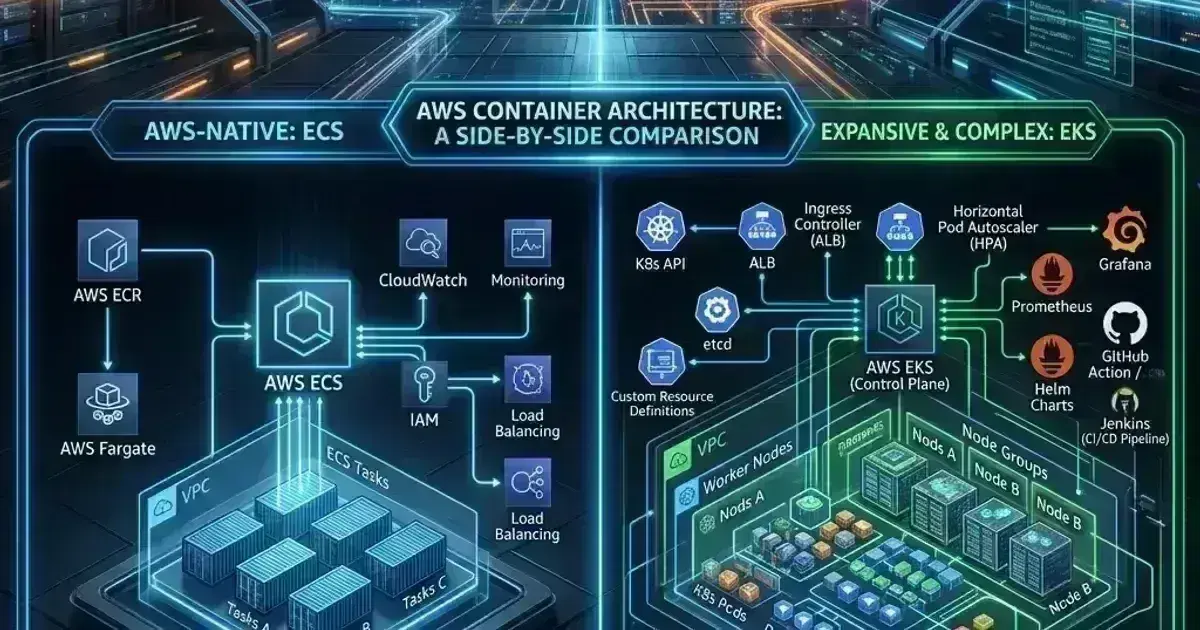
ECS and EKS are both AWS container orchestrators, but they reflect fundamentally different design philosophies. ECS is a tightly AWS-integrated managed service with a simpler operational model. EKS runs Kubernetes — more powerful, more complex, more portable. The choice isn't always obvious. This covers ECS architecture (tasks, services, clusters), ECS on Fargate vs EC2, how ECS compares to EKS on networking, IAM, scaling, and operational burden, and the workload patterns where each makes sense.
14 min read · AWS
The question isn't which service is better — it's which one fits your workload, your team, and your operational constraints. ECS is simpler, deeply integrated with AWS, and requires almost no Kubernetes knowledge. EKS gives you the full Kubernetes ecosystem but demands more from the platform team operating it.
Most AWS-native teams starting fresh should evaluate ECS on Fargate first. Teams with existing Kubernetes expertise, multi-cloud requirements, or workloads that need Kubernetes-specific tooling (Helm, Argo, KEDA) should consider EKS.
ECS Architecture
ECS has three core primitives:
Task Definition — the blueprint for a container (or group of containers). Equivalent to a Kubernetes Pod spec. Defines the container image, CPU/memory allocations, environment variables, ports, volume mounts, IAM task role, and logging configuration.
Task — a running instance of a Task Definition. A task can contain multiple containers that share network namespace and optionally storage. Tasks are ephemeral — they run and stop.
Service — keeps a desired number of tasks running. Handles scheduling, health checking, and replacement of failed tasks. Equivalent to a Kubernetes Deployment + Service combined.
1// Task Definition example (simplified)
2{
3  "family": "payments-api",
4  "networkMode": "awsvpc",
5  "requiresCompatibilities": ["FARGATE"],
6  "cpu": "512",
7  "memory": "1024",
8  "taskRoleArn": "arn:aws:iam::012345678901:role/PaymentsApiTaskRole",
9  "executionRoleArn": "arn:aws:iam::012345678901:role/EcsTaskExecutionRole",
10  "containerDefinitions": [
11    {
12      "name": "payments-api",
13      "image": "012345678901.dkr.ecr.us-east-1.amazonaws.com/payments-api:1.2.3",
14      "portMappings": [{"containerPort": 8080, "protocol": "tcp"}],
15      "environment": [
16        {"name": "ENV", "value": "production"}
17      ],
18      "secrets": [
19        {
20          "name": "DATABASE_URL",
21          "valueFrom": "arn:aws:secretsmanager:us-east-1:012345678901:secret:prod/payments/db-url"
22        }
23      ],
24      "logConfiguration": {
25        "logDriver": "awslogs",
26        "options": {
27          "awslogs-group": "/ecs/prod/payments-api",
28          "awslogs-region": "us-east-1",
29          "awslogs-stream-prefix": "ecs"
30        }
31      },
32      "healthCheck": {
33        "command": ["CMD-SHELL", "curl -f http://localhost:8080/health || exit 1"],
34        "interval": 30,
35        "timeout": 5,
36        "retries": 3,
37        "startPeriod": 60
38      }
39    }
40  ]
41}
ECS Task Definitions have a secrets field that pulls values from Secrets Manager or Parameter Store directly into container environment variables — this is simpler than the ESO/CSI driver setup required on EKS.
Launch Types: Fargate vs EC2
Fargate
Fargate abstracts EC2 instances entirely. You declare CPU and memory at the task level; AWS provisions the underlying compute. No node management, no OS patching, no SSH access.
1# Deploy a Fargate service
2aws ecs create-service \
3  --cluster prod-cluster \
4  --service-name payments-api \
5  --task-definition payments-api:3 \
6  --desired-count 3 \
7  --launch-type FARGATE \
8  --network-configuration "awsvpcConfiguration={subnets=[subnet-private-1a,subnet-private-1b],securityGroups=[sg-payments-api],assignPublicIp=DISABLED}" \
9  --load-balancers "targetGroupArn=arn:aws:elasticloadbalancing:us-east-1:012345678901:targetgroup/payments-api/abc123,containerName=payments-api,containerPort=8080"
Fargate pros:
- No EC2 instances to manage, patch, or right-size
- Each task gets its own isolated compute environment (strong multi-tenant isolation)
- Pay per task CPU/memory second (no idle capacity cost for infrequent workloads)
- Fargate supports EKS too — EKS Fargate profiles run pods on Fargate
Fargate cons:
- More expensive per compute unit than EC2 for sustained workloads (the effective premium varies widely — 20-60% depending on instance family, packing efficiency, and savings plan coverage)
- No GPU support (Fargate supports x86 and ARM but no NVIDIA GPUs)
- Cold start latency — Fargate tasks typically take 30-90 seconds to start depending on image size and region capacity (no pre-warmed pool)
- No
docker exec/ SSH access into running tasks for debugging
EC2 Launch Type
EC2 launch type uses EC2 instances you manage as the underlying compute. The ECS agent running on each instance registers the node with the cluster, and ECS schedules tasks onto the instances.
1# Register EC2 instances to a cluster (via user data on the EC2 instance)
2# /etc/ecs/ecs.config on the EC2 instance:
3# ECS_CLUSTER=prod-cluster
4
5# Or use ECS-optimized AMI with the cluster name in user data:
6#!/bin/bash
7echo ECS_CLUSTER=prod-cluster >> /etc/ecs/ecs.config
EC2 launch type is appropriate when:
- You run sustained high-density workloads where the Fargate cost premium adds up
- You need GPUs for ML inference workloads
- You need access to specific instance features (local NVMe, placement groups, Nitro enclaves)
- You want to use Spot instances for significant cost reduction
ECS Networking
ECS supports three network modes:
| Mode | Description | Use case |
|---|---|---|
awsvpc | Each task gets its own ENI and VPC IP | Fargate (required), EC2 (recommended for most cases) |
bridge | Docker bridge networking with port mapping | Legacy EC2 setups |
host | Container uses host network namespace | High-performance networking (rare) |
awsvpc mode is the right choice for almost all modern ECS workloads. Each task has its own security group and VPC IP — the same security group model you use for EC2 instances applies directly to tasks.
Service Discovery
ECS services can register with AWS Cloud Map for DNS-based service discovery:
1# Create a Cloud Map namespace
2aws servicediscovery create-private-dns-namespace \
3  --name prod.internal \
4  --vpc vpc-abc123
5
6# Enable service discovery on an ECS service
7aws ecs create-service \
8  --cluster prod-cluster \
9  --service-name payments-api \
10  --task-definition payments-api:3 \
11  --desired-count 3 \
12  --launch-type FARGATE \
13  --network-configuration "..." \
14  --service-registries "registryArn=arn:aws:servicediscovery:us-east-1:012345678901:service/srv-abc123"
With Cloud Map, payments-api.prod.internal resolves to the private IPs of all running tasks, updated automatically as tasks start and stop.
Alternatively, services communicate via an Application Load Balancer — each service has its own target group, and internal services use an internal ALB for routing.
AWS Cost & Architecture Review Checklist
The questions we ask in a paid AWS review — rightsizing, storage classes, network egress, and the usual five-figure surprises. Plain Markdown.
Free. Instant download. You'll also get the occasional deep-dive from the newsletter — unsubscribe anytime.
IAM for ECS
ECS uses two IAM roles:
Task Role: IAM permissions for the application code running inside the container (S3 access, DynamoDB, Secrets Manager). Equivalent to IRSA in EKS — credentials are vended to the container via the task metadata endpoint.
Execution Role: IAM permissions for ECS to start the task — pulling the container image from ECR, reading Secrets Manager values to inject as environment variables, writing to CloudWatch Logs.
1// Execution role — ECS infrastructure permissions
2{
3  "Statement": [
4    {
5      "Effect": "Allow",
6      "Action": [
7        "ecr:GetAuthorizationToken",
8        "ecr:BatchCheckLayerAvailability",
9        "ecr:GetDownloadUrlForLayer",
10        "ecr:BatchGetImage",
11        "logs:CreateLogStream",
12        "logs:PutLogEvents"
13      ],
14      "Resource": "*"
15    },
16    {
17      "Effect": "Allow",
18      "Action": ["secretsmanager:GetSecretValue"],
19      "Resource": "arn:aws:secretsmanager:us-east-1:012345678901:secret:prod/payments/*"
20    }
21  ]
22}
The task role credentials are available to the container at 169.254.170.2 (the ECS task metadata endpoint). AWS SDKs automatically discover these credentials via the AWS_CONTAINER_CREDENTIALS_RELATIVE_URI environment variable injected by ECS — no OIDC, no IRSA setup needed.
Auto Scaling
ECS services scale using Application Auto Scaling, which can target CPU utilization, memory utilization, request count, or custom CloudWatch metrics:
1# Register the ECS service as a scalable target
2aws application-autoscaling register-scalable-target \
3  --service-namespace ecs \
4  --resource-id service/prod-cluster/payments-api \
5  --scalable-dimension ecs:service:DesiredCount \
6  --min-capacity 2 \
7  --max-capacity 20
8
9# Target tracking — scale to maintain 70% CPU
10aws application-autoscaling put-scaling-policy \
11  --service-namespace ecs \
12  --resource-id service/prod-cluster/payments-api \
13  --scalable-dimension ecs:service:DesiredCount \
14  --policy-name payments-api-cpu-scaling \
15  --policy-type TargetTrackingScaling \
16  --target-tracking-scaling-policy-configuration '{
17    "TargetValue": 70.0,
18    "PredefinedMetricSpecification": {
19      "PredefinedMetricType": "ECSServiceAverageCPUUtilization"
20    },
21    "ScaleInCooldown": 300,
22    "ScaleOutCooldown": 60
23  }'
ECS also supports step scaling for more aggressive scale-up policies and scheduled scaling for predictable traffic patterns.
ECS vs EKS: Head-to-Head
| Dimension | ECS | EKS |
|---|---|---|
| Operational complexity | Low — no control plane to manage | Higher — cluster upgrades, add-on management |
| Kubernetes API | No | Yes — full Kubernetes API |
| Ecosystem | AWS-native only | Entire CNCF ecosystem (Helm, Argo, Istio, KEDA, etc.) |
| Multi-cloud / portability | AWS-only | Portable — same Kubernetes on GKE, AKS, on-prem |
| Serverless compute | Fargate (first-class) | EKS Fargate profiles (more limited) |
| Networking | awsvpc with security groups | VPC CNI (more complex pod IP management) |
| Service mesh | App Mesh or ALB-based | Any sidecar (Istio, Linkerd, Cilium) |
| Secrets injection | Native via task definition secrets field | External Secrets Operator or CSI driver |
| Auto scaling | Application Auto Scaling | HPA + KEDA + Cluster Autoscaler/Karpenter |
| GPU support | EC2 launch type only | Yes (managed node groups) |
| Cost | Fargate: pay-per-task; EC2: node management overhead | Control plane: $0.10/hour; node management overhead |
| Debugging | CloudWatch Container Insights, ECS Exec | kubectl, exec, ephemeral containers |
| Deployment patterns | Blue/green via CodeDeploy, rolling | Rolling, blue/green (Argo Rollouts), canary |
| Job workloads | ECS tasks (one-shot), Scheduled tasks | Kubernetes Jobs, CronJobs, Argo Workflows |
When ECS makes sense
- Serverless-first: Fargate on ECS is the simplest way to run containers without managing infrastructure. If you don't need the Kubernetes ecosystem, ECS+Fargate is lower operational burden.
- Small teams: ECS doesn't require a dedicated platform team. A single developer can deploy and operate ECS services.
- AWS-native toolchain: if your workflow is CodePipeline → CodeBuild → ECS, the integration is seamless. EKS integration with AWS CI/CD tools is possible but requires more configuration.
- Cost optimization via Spot: ECS with Spot instances and Fargate Spot is straightforward. Karpenter on EKS provides similar capability but with more complexity.
- Existing investment: if you have years of ECS Task Definitions, deployment pipelines, and institutional knowledge, migration to EKS needs a clear payoff.
When EKS makes sense
- Existing Kubernetes expertise: if your team already knows Kubernetes, EKS removes the learning curve. Starting with ECS when you know Kubernetes adds a new system to learn for less benefit.
- Multi-cloud or hybrid: Kubernetes runs identically on AWS, GCP, Azure, and on-premises. If you need to avoid cloud lock-in or run workloads across environments, Kubernetes portability matters.
- Complex workloads: ML pipelines (Argo Workflows, Kubeflow), custom operators, GitOps (ArgoCD, Flux), service meshes, KEDA event-driven scaling — these live in the Kubernetes ecosystem. ECS has no equivalent.
- Advanced deployment patterns: Argo Rollouts, progressive delivery, A/B testing, canary analysis — Kubernetes has mature tooling here that ECS doesn't match.
- Large organizations: when you have 20+ teams each deploying services, Kubernetes RBAC, namespaces, and admission policies provide multi-tenancy that ECS can't match.
Frequently Asked Questions
Can I run EKS and ECS in the same AWS account?
Yes — they're completely independent. Many organizations run ECS for simple services and EKS for complex workloads in the same account and VPC. Traffic between them crosses the VPC normally via private IPs or internal load balancers.
Is Fargate on EKS the same as ECS Fargate?
EKS Fargate profiles let you run Kubernetes pods on Fargate — no node management, similar pricing model. But EKS Fargate has limitations that ECS Fargate doesn't: no DaemonSets (per-node agents can't run on Fargate pods), no EBS persistent volumes (EFS is supported via both static and dynamic PVC provisioning using the EFS CSI driver), and no privileged containers. For simpler Fargate workloads, ECS Fargate is more capable.
What does ECS cost vs EKS?
ECS: the ECS control plane is free. You pay for EC2 instances or Fargate compute that runs your tasks.
EKS: $0.10/hour per cluster (~$72/month) for the control plane, plus EC2 or Fargate compute costs. For Fargate, compute pricing is the same on both ECS and EKS.
The cost difference is the $0.10/hour EKS control plane fee. For a single cluster, this is negligible. For 20 small clusters, it adds $1,440/month.
How do I migrate from ECS to EKS?
Migration is primarily a task definition → Kubernetes manifest translation:
- Convert Task Definition container specs to Pod/Deployment manifests
- Replace ECS task roles with IRSA service account annotations
- Replace
secretsfield with External Secrets Operator or CSI driver - Replace CloudWatch log groups with Fluent Bit + Container Insights
- Replace Application Auto Scaling policies with HPA + KEDA
- Replace Cloud Map service discovery with Kubernetes Services
No live migration is possible — ECS tasks and Kubernetes pods are incompatible at the runtime level. Migrate services one at a time behind a load balancer, with the ability to roll back.
For the VPC and networking foundation shared by both ECS and EKS, see AWS VPC Design for EKS: Subnets, NAT, and Security Groups. For EKS-specific node autoscaling that ECS handles via Application Auto Scaling, see Kubernetes Cluster Autoscaler and Karpenter: Node Autoscaling on EKS.
Evaluating whether to migrate from ECS to EKS, designing a hybrid ECS+EKS architecture, or optimizing ECS Fargate costs for a batch processing workload? Talk to us at Coding Protocols — we help platform teams make container orchestration decisions that match their actual operational maturity and workload requirements.
Official References
- Amazon EKS pricing — current control-plane, extended-support and Auto Mode rates
- AWS Fargate pricing — per-vCPU and per-GB rates and the supported CPU/memory pairings
- Amazon EKS User Guide — cluster architecture, versions and add-ons
- EKS Kubernetes versions — the version support and extended support policy
- Amazon ECS Developer Guide — task definitions, services and launch types
Was this article helpful?
Be the first to rate this article
Related Topics
Found this useful? Share it.