AWS Amplify in a VPC: Connecting to RDS and Private Resources
Quick answer
One of the biggest hurdles for enterprise Amplify projects is networking. Here is how to correctly configure Amplify Gen 2 to talk to RDS inside a private VPC without breaking the bank.
- 1. The Core Architecture: VPC Lambda Attachment
- 2. The Private Subnet Catch: Internet Access
- 3. Amplify Gen 2 Implementation
- 4. Connecting to RDS: Proxy vs. Direct
- 5. Summary and Best Practices
15 min read · Cloud Engineering
AWS Amplify is often praised for its "Serverless" simplicity, but for enterprise applications, "Serverless" doesn't mean "No Networking." Nearly every serious application eventually needs to connect to an Amazon RDS database or a private microservice residing within a Virtual Private Cloud (VPC).
By default, Amplify's backend (Lambda functions) runs in a managed service environment outside your VPC. If your database is tucked away in a private subnet for security, Amplify can't see it—unless you bridge the gap.
In this guide, we'll look at how to architect Amplify Gen 2 for VPC connectivity.
1. The Core Architecture: VPC Lambda Attachment
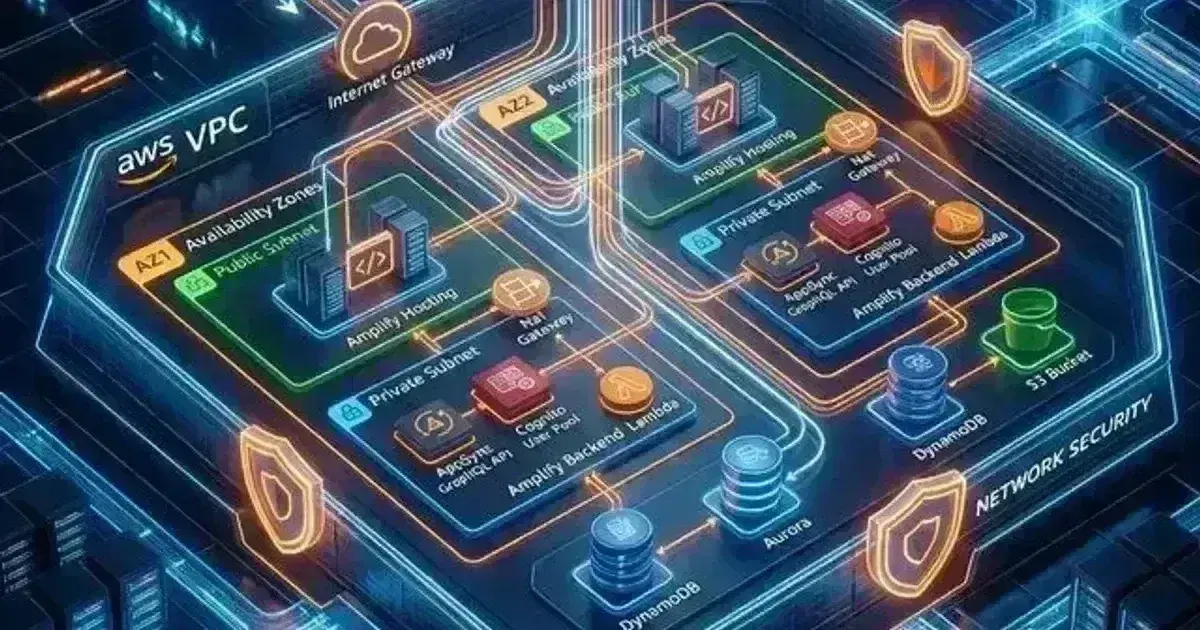
To get your Amplify backend to "talk" to your VPC, you must attach your Lambda functions to specific subnets within that VPC.
When a Lambda is VPC-attached:
- It is assigned an Elastic Network Interface (ENI) from your subnet's IP pool.
- It gains a private IP address within that subnet.
- It obeys the Security Group rules of that VPC.
Security Group Checklist
For a Lambda to talk to RDS:
- Outbound (Lambda SG): Allow TCP egress on the database port (e.g., 5432 for Postgres) to the RDS Security Group.
- Inbound (RDS SG): Allow TCP ingress on the database port from the Lambda's Security Group.
2. The Private Subnet Catch: Internet Access
This is where most engineers get stuck. When you attach a Lambda to a VPC, it loses its default access to the public internet.
If your Lambda needs to call an external API (like Stripe or Twilio), or even talk to other AWS services like S3 (without a VPC Endpoint), you have two choices:
- The Expensive Way (NAT Gateway): Route your private subnet traffic through a NAT Gateway in a public subnet. Warning: NAT Gateways cost ~$32/month + data processing fees.
- The Efficient Way (VPC Endpoints): Use Interface VPC Endpoints (PrivateLink) for specific AWS services. This is often cheaper and more secure than a NAT Gateway if you only need to talk to AWS services.
3. Amplify Gen 2 Implementation
In Amplify Gen 2, networking is defined in your amplify/backend.ts using CDK overrides. Because defineFunction doesn't currently expose full VPC props, we leverage the backend object to reach into the underlying CloudFormation resource.
1import { defineBackend } from '@aws-amplify/backend';
2import { auth } from './auth/resource';
3import { data } from './data/resource';
4import { myVpcLambda } from './functions/my-vpc-lambda/resource';
5import * as ec2 from 'aws-cdk-lib/aws-ec2';
6
7const backend = defineBackend({
8  auth,
9  data,
10  myVpcLambda
11});
12
13// Reference an existing VPC
14const vpc = ec2.Vpc.fromLookup(backend.myVpcLambda.resources.lambda.stack, 'ExternalVpc', {
15  vpcId: 'vpc-12345678'
16});
17
18// Apply VPC configuration via CDK escape hatch (L1 override)
19const lambdaFunc = backend.myVpcLambda.resources.lambda;
20const cfnFunction = lambdaFunc.node.defaultChild as CfnFunction;
21cfnFunction.vpcConfig = {
22  subnetIds: vpc.privateSubnets.map(s => s.subnetId),
23  securityGroupIds: ['sg-87654321'],
24};
AWS Cost & Architecture Review Checklist
The questions we ask in a paid AWS review — rightsizing, storage classes, network egress, and the usual five-figure surprises. Plain Markdown.
Free. Instant download. You'll also get the occasional deep-dive from the newsletter — unsubscribe anytime.
4. Connecting to RDS: Proxy vs. Direct
If you are using AWS Lambda to talk to RDS, you should almost always use an RDS Proxy.
- Connection Pooling: Lambda scales out fast and can easily exhaust the connection limit of a small RDS instance. RDS Proxy pools these connections for you.
- IAM Auth: RDS Proxy supports IAM authentication, meaning you don't have to manage database passwords inside your Lambda environment variables.
Amplify Data Integration
Amplify Data (AppSync) can now connect directly to RDS using the a.sql() command, which handles much of the boilerplate Lambda generation for you. However, you still need to ensure the VPC secrets (db host, port, user) are correctly mapped in AWS Secrets Manager.
5. Summary and Best Practices
- Least Privilege: Only attach Lambdas to a VPC if they actually need to reach private resources.
- Availability Zones: Always select multiple subnets (at least two) across different AZs to avoid a single point of failure.
- Monitor ENI Limits: If your Lambda scales to thousands of concurrent executions, ensure your subnet has enough IP addresses available for the ENIs.
- Use CDK for Clean Netops: Don't manually click around the console. Define your VPC logic in
backend.tsso it's reproducible across dev, staging, and prod.
Struggling with complex AWS networking or VPC routing for your Amplify apps? Book a consultation with our Cloud Architects. We specialize in bridging the gap between frontend simplicity and enterprise infrastructure.
For the hosting decision one level up, see Vercel vs AWS Amplify Gen 2.
Frequently Asked Questions
Why does my Lambda lose internet access after attaching it to a VPC?
Because a VPC-attached function uses the subnet's routing, and a private subnet has no route to the internet without a NAT gateway. Anything calling an external API or a public AWS endpoint stops working. This is the single most common surprise when moving functions into a VPC.
Do I need a NAT gateway, or is there a cheaper option?
VPC endpoints for AWS services avoid NAT entirely and are cheaper for that traffic, since they keep it on the AWS network. You still need NAT for genuinely external calls. Many functions need only AWS services, in which case endpoints alone are enough.
Should I connect to RDS directly or through RDS Proxy?
Through the proxy for anything serverless. Lambda scales to many concurrent executions and each one opening its own database connection exhausts the connection limit quickly. The proxy pools connections, which is exactly the mismatch between Lambda's concurrency model and a database's connection budget.
What is the cold start cost of VPC attachment?
Far smaller than it used to be, since AWS changed how ENIs are provisioned — the per-invocation penalty is largely gone. Do not size architecture decisions around advice written before that change; measure your own cold starts rather than assuming the old numbers apply.
Official References
- Amazon VPC pricing — NAT Gateway hourly and per-GB processing charges
- AWS Lambda pricing — request, duration and provisioned-concurrency rates
- Amazon VPC User Guide — subnets, route tables and gateway options
- AWS Lambda Developer Guide — execution model, concurrency and configuration
Was this article helpful?
Be the first to rate this article
Related Topics
Found this useful? Share it.