EKS vs AKS: A Production Engineer's Comparison (2026)
Quick answer
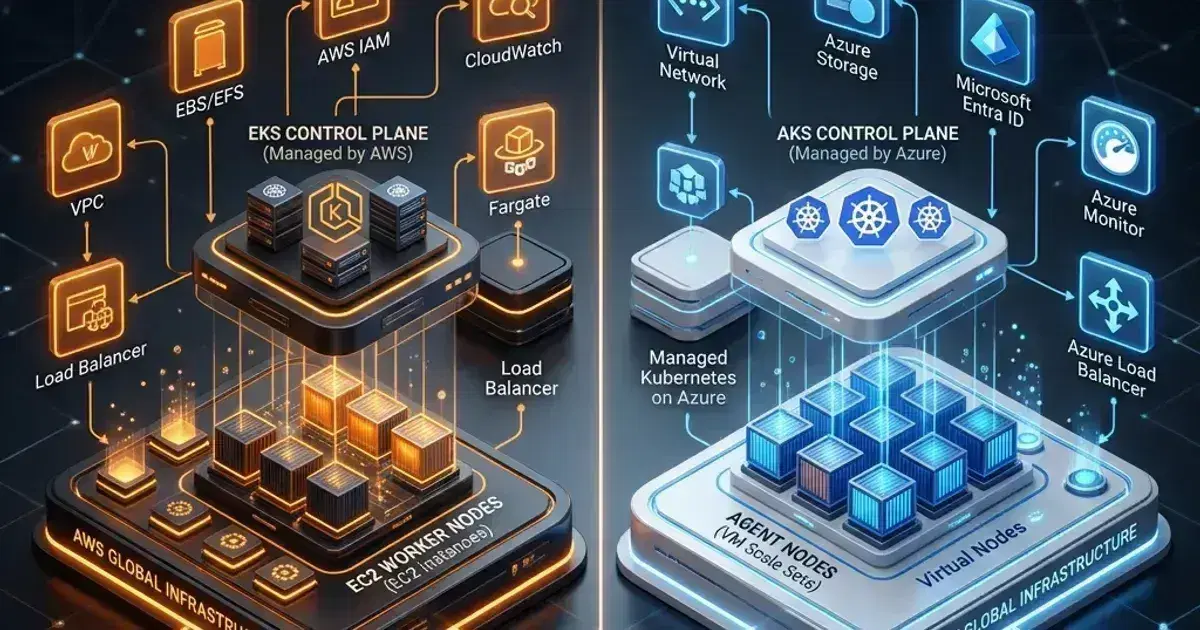
AWS EKS and Azure AKS are both mature managed Kubernetes platforms, but they make different trade-offs on control plane cost, node management, networking, identity, and ecosystem integration. Here's the comparison that matters for production decisions.
15 min read · Kubernetes
AWS EKS and Azure AKS are the two dominant managed Kubernetes platforms outside GKE. If your organisation is in AWS or Azure, or if you're evaluating which cloud to standardise on for Kubernetes workloads, this is the comparison that matters.
Both are mature. Both run standard upstream Kubernetes. Both will handle production workloads without heroics. The differences are in cost model, ecosystem integration, networking architecture, identity, and the operational sharp edges you'll encounter at scale.
Control Plane
EKS
EKS charges $0.10/hour per cluster (~$73/month) regardless of cluster size. The control plane (API server, etcd, scheduler) is fully managed by AWS — you never touch it. AWS handles control plane upgrades, but you must initiate them. The control plane runs in AWS-managed VPC; your nodes run in your VPC and communicate with the control plane via a managed endpoint.
EKS supports both public and private cluster endpoints. Private endpoint clusters route all kubectl traffic through your VPC, which most security teams require.
AKS
AKS has no control plane charge — the managed control plane is free. You pay only for node VMs. This is a meaningful cost difference for smaller teams or organisations running many small clusters: an EKS cluster costs $73/month before a single node is provisioned; AKS costs nothing until you add nodes.
The trade-off: AKS offers less control plane visibility. Customers cannot access etcd, and the API server is shared infrastructure with SLA-driven guarantees rather than dedicated per-cluster resources. For large clusters under heavy load, this can surface as API server throttling that is harder to diagnose than in EKS.
AKS also supports private clusters (API server accessible only within your VNet), which is the standard for production deployments in regulated environments.
Verdict: AKS wins on cost for multi-cluster setups. EKS offers more control plane transparency at a per-cluster fee.
Node Management
EKS Node Pools
EKS supports three node types:
Managed Node Groups — EKS-managed EC2 Auto Scaling Groups. Node upgrades drain, cordon, and replace nodes automatically when you trigger an upgrade. Best for most workloads.
Self-Managed Nodes — You manage the Auto Scaling Group, AMI, and bootstrap scripts. Required if you need specific instance configurations not supported by managed node groups. More operational overhead, same compute.
Fargate — Serverless nodes; each pod gets its own isolated micro-VM. No node management. Works well for batch jobs and bursty workloads. Does not support DaemonSets (a significant limitation for logging and monitoring agents).
Karpenter — The preferred autoscaler for EKS. Provisions nodes directly via EC2, without node groups. Faster scaling (30–60 seconds vs 3–5 minutes for Cluster Autoscaler), better bin-packing, native spot/on-demand fallback. See How to Install Karpenter on EKS for the setup guide.
AKS Node Pools
AKS uses Node Pools backed by Azure Virtual Machine Scale Sets (VMSS). You can have multiple node pools per cluster with different VM sizes, OS configurations, and spot/on-demand settings.
System node pools run system pods (CoreDNS, metrics-server, etc.). You must have at least one. User node pools run application workloads. Separating system from workload nodes is a first-class AKS concept — EKS achieves the same via taints and node labels, but it's more manual.
Virtual Nodes (via Azure Container Instances) — serverless burst capacity similar to Fargate, but typically used for temporary overflow rather than primary workloads.
KEDA (Kubernetes Event-Driven Autoscaling) is a first-class AKS add-on and works well across both platforms, but AKS has tighter integration with Azure Event Hubs and Service Bus triggers.
Node auto-provisioning (AKS's Karpenter equivalent, GA since July 2025) — AKS supports Karpenter-style node provisioning via Node Auto Provisioning (NAP), which deploys and manages the upstream Karpenter Azure provider for you. It's less battle-tested than Karpenter on EKS but closing the gap.
Verdict: EKS + Karpenter has a more mature auto-provisioning story. AKS's system/user node pool separation is cleaner ergonomically.
Networking
EKS Networking
EKS uses the AWS VPC CNI by default. Each pod gets an IP directly from your VPC subnet — pods are first-class VPC citizens with ENI-assigned IPs. This means:
- No overlay network — pod IPs are routable within your VPC
- Pod-to-pod communication goes through the VPC network
- VPC security groups can be applied directly to pods (
SecurityGroupPolicyCRD) - IP exhaustion is a real concern: each node consumes IP addresses for potential pods (
max-podsis determined by instance type's ENI capacity)
IPv4 exhaustion is a known EKS pain point on large clusters. Workarounds include custom networking (prefix delegation), IPv6-only clusters, or CIDR-separated node subnets. These are solvable but require planning.
Supported CNIs beyond VPC CNI: Cilium (increasingly popular, replaces VPC CNI for eBPF network policy), Calico, Weave.
AKS Networking
AKS supports two CNI modes:
Azure CNI — Similar to VPC CNI. Each pod gets a VNet IP. Same advantages (VNet-native routing, no overlay) and same IP exhaustion risks.
Azure CNI Overlay (GA 2024, recommended for new clusters) — Pods get IPs from a private overlay range (not your VNet CIDR). This eliminates IP exhaustion entirely. Pod-to-external traffic is NAT'd at the node. This is now the recommended default for most AKS clusters.
kubenet — Older, simple overlay. Pods get cluster-internal IPs, nodes do the routing. Limited feature support; avoid for new clusters.
Cilium is also available as a managed AKS network policy engine — Azure CNI Powered by Cilium is generally available, and is the default data plane on AKS Automatic clusters. AKS's Cilium integration is tighter than EKS's — it's offered as a first-class add-on.
Network Policy:
- EKS: Network policy requires a separate CNI plugin (Calico, Cilium, or the AWS Network Policy Controller added in 2023)
- AKS: Azure Network Policy or Calico is built-in; Cilium is an add-on option
Verdict: AKS's Azure CNI Overlay solves the IP exhaustion problem cleanly. EKS's VPC CNI gives deeper AWS network integration at the cost of VPC IP space.
Identity and Access
This is where the platforms diverge most significantly for security-conscious teams.
EKS: IAM Integration
IRSA (IAM Roles for Service Accounts) — The legacy method. Annotate a Kubernetes service account with an IAM role ARN; pods using that service account get temporary credentials via OIDC. Requires OIDC provider setup per cluster.
EKS Pod Identity (GA 2024, recommended) — Simpler than IRSA. No OIDC provider management. You create an association between a service account and an IAM role via the EKS API. The Pod Identity Agent (a DaemonSet) injects credentials into pods. No annotation required on the pod spec.
aws eks create-pod-identity-association \
  --cluster-name my-cluster \
  --namespace production \
  --service-account my-app \
  --role-arn arn:aws:iam::123456789:role/MyAppRole
Cluster access (aws-auth ConfigMap vs Access Entries) — Historically, node and user IAM-to-Kubernetes RBAC mapping was done via the aws-auth ConfigMap, a fragile and error-prone mechanism. In 2024, AWS introduced Access Entries — a proper API for managing cluster access without touching the ConfigMap. New clusters should use Access Entries exclusively.
AKS: Azure AD Integration
Workload Identity (the modern approach, GA 2023) — Federated identity between Azure AD and Kubernetes service accounts. Pods use a service account annotated with an Azure managed identity client ID. The Azure Workload Identity webhook injects OIDC token files into pods, which the Azure SDK automatically uses. No secrets stored in the cluster.
AAD Pod Identity (deprecated) — The old approach, replaced by Workload Identity. If you see tutorials using AzureIdentity and AzureIdentityBinding CRDs, those are the deprecated method.
Azure RBAC for Kubernetes — AKS can use Azure RBAC for cluster authorization (instead of Kubernetes RBAC). Users authenticate with Azure AD; their Azure role assignments map to cluster permissions. This is cleaner for organisations already using Azure RBAC for everything, but it reduces portability (your RBAC config is in Azure, not in the cluster).
Microsoft Entra ID integration — AKS integrates natively with Entra ID (formerly Azure AD) for user authentication. EKS requires an external OIDC provider (Okta, Google Workspace, etc.) for user authentication — AWS doesn't have a native identity provider equivalent.
Verdict: AKS wins for organisations in the Microsoft ecosystem (Entra ID, M365, Azure AD). EKS's Pod Identity is mature and sufficient but requires managing your own identity provider for human user authentication.
Kubernetes Production Readiness Checklist
The pre-launch checks we run before calling a cluster production-ready — probes, resources, RBAC, upgrades, and backups. Plain Markdown you can commit to your repo.
Free. Instant download. You'll also get the occasional deep-dive from the newsletter — unsubscribe anytime.
Storage
EKS Storage
EKS uses the EBS CSI driver (AWS managed, installed separately or via EKS managed add-on) for block storage:
storageClassName: gp3EBS volumes are zonal — a volume in us-east-1a can only be attached to nodes in us-east-1a. For StatefulSets with multiple replicas across zones, this requires either zone-aware topology constraints or a cross-zone storage solution.
EFS CSI driver — AWS Elastic File System, NFS-compatible, cross-AZ. Use for ReadWriteMany volumes. Slightly more complex to set up (requires EFS filesystem + mount targets per subnet).
FSx for Lustre — High-performance parallel filesystem, niche use case (HPC, ML training).
AKS Storage
AKS uses the Azure Disk CSI driver (pre-installed) for block storage:
storageClassName: managed-premium # or managed-csiAzure Disk is also zonal. The same cross-zone limitation applies.
Azure Files CSI driver — NFS or SMB-compatible shared storage, equivalent to EFS. Available out of the box. Azure Files Premium (SSD-backed) is suitable for production workloads.
Azure NetApp Files — High-performance NFS storage, better IOPS than Azure Files. Relevant for database workloads.
Both platforms support dynamic PV provisioning via StorageClass. The operational experience is similar; the difference is in the underlying service characteristics (IOPS limits, pricing, zone topology).
Verdict: Roughly equivalent. EFS (EKS) and Azure Files (AKS) both satisfy ReadWriteMany requirements. EBS vs Azure Disk performance characteristics vary by instance/VM type — benchmark for your specific workload.
Ingress and Load Balancing
EKS
EKS ships with the AWS Load Balancer Controller (managed add-on), which creates ALBs for Ingress resources and NLBs for Service objects of type LoadBalancer.
ALB features available natively: path-based routing, host-based routing, weighted target groups (for canary deployments), WAF integration, authentication via Cognito or OIDC, SSL termination.
For cluster-internal routing, most EKS teams use Nginx Ingress Controller or Traefik rather than ALB for every service — ALBs are expensive when you have 50+ services.
AKS
AKS has the Application Gateway Ingress Controller (AGIC) as a managed add-on. Azure Application Gateway (Layer 7 load balancer with WAF) manages ingress. Similar feature set to ALB: path routing, SSL, WAF, autoscaling.
Nginx Ingress Controller is also available and widely used on AKS for the same reasons as EKS — per-service load balancer costs add up.
Gateway API support is available on both platforms, moving from Ingress to the more expressive Gateway API model (HTTPRoute, GatewayClass).
Verdict: Similar feature parity. Both have a native cloud LB add-on and support Nginx/Traefik as alternatives.
Observability
EKS
No built-in observability stack — you bring your own:
- CloudWatch Container Insights — AWS-native, installed as an add-on. Collects metrics and logs. Integrates with CloudWatch dashboards and alarms.
- Amazon Managed Prometheus + Grafana — Managed Prometheus (AMP) with managed Grafana. Full Prometheus-compatible API, minimal operational overhead.
- OpenTelemetry Operator — AWS Distro for OpenTelemetry (ADOT) as a managed add-on.
Most EKS teams run Prometheus + Grafana (self-managed or AMP/AMG) for metrics and Fluent Bit → CloudWatch Logs or OpenSearch for logs.
AKS
Azure Monitor for Containers — built-in monitoring with Container Insights. Metrics and logs sent to Log Analytics workspace. Pre-built dashboards in Azure portal.
Managed Prometheus + Grafana — Azure Managed Prometheus (also available, same model as AMP) with Azure Managed Grafana.
AKS's advantage: the monitoring integration is turned on with a flag (--enable-azure-monitor-metrics), and the default experience works out of the box without installing Prometheus operators. The trade-off is vendor lock-in to Azure Monitor's query language (KQL) vs. PromQL.
Verdict: AKS's managed observability story is lower-friction to get started. EKS is more flexible but requires more wiring.
Upgrades
Both platforms lag upstream Kubernetes by several months and support N-2 minor versions.
EKS Upgrade Model
EKS requires you to upgrade:
- The control plane (
aws eks update-cluster-version) - Managed node groups (separately, per node group)
- Add-ons (kube-proxy, CoreDNS, VPC CNI, EBS CSI) — each versioned independently
Extended support — EKS offers paid extended support for Kubernetes versions past standard EOL (~14 months of standard support, then 12 months of extended for $0.60/cluster/hour). Useful for large clusters where upgrades are risky.
EKS upgrades can be automated with managed node groups, but many teams still do them manually to control timing.
AKS Upgrade Model
AKS upgrades are similarly manual-or-automated. Auto-upgrade channels (patch, stable, rapid, node-image) let you opt into automatic upgrades — a feature EKS lacks natively.
Node image upgrades are decoupled from Kubernetes version upgrades in AKS. You can update node OS images (security patches) without upgrading Kubernetes. This is a meaningful operational advantage — OS security patches shouldn't require a Kubernetes upgrade.
EKS achieves the same via Karpenter's expireAfter (node rotation picks up fresh AMIs), but AKS's node image upgrade channel is more explicit.
Verdict: AKS's auto-upgrade channels and decoupled node image upgrades make maintenance lower-friction. EKS's extended support is valuable for organisations that can't upgrade quickly.
Pricing Summary
| EKS | AKS | |
|---|---|---|
| Control plane | $0.10/hr (~$73/mo) | Free |
| Nodes | EC2 pricing | Azure VM pricing |
| Spot/preemptible | EC2 Spot (up to 90% off) | Azure Spot VMs (similar) |
| Fargate/virtual nodes | Per vCPU/GB/second | Azure Container Instances |
| Extended support | $0.60/cluster/hr | Free (AKS LTS channels) |
For a typical 3-cluster setup (dev, staging, prod), EKS control plane costs ~$219/month before nodes. For large organisations running 20+ clusters, this becomes significant ($1,460+/month in control plane fees alone).
AKS's free control plane makes it materially cheaper at scale for cluster-heavy organisations.
When to Choose EKS
- You're already on AWS and use AWS services (RDS, S3, SQS, DynamoDB) extensively — VPC-native pod IPs and IAM integration are cleaner on EKS
- You need Karpenter's mature autoscaling — more battle-tested than AKS Node Auto Provisioning
- Your team has strong AWS IAM expertise
- You need fine-grained control plane visibility
- You're running ML/AI workloads that need AWS-specific instance types (Inferentia, Trainium) or FSx for Lustre
When to Choose AKS
- You're already on Azure (Microsoft 365, Entra ID, Azure DevOps)
- You're running many small clusters — free control plane is a real cost saving
- Your security team requires Entra ID integration for cluster authentication
- You want lower-friction managed observability (Azure Monitor out of the box)
- You need AKS's auto-upgrade channels for compliance (mandatory patching SLAs)
- Windows containers are a requirement — AKS Windows node pool support is more mature
Frequently Asked Questions
Is EKS or AKS more reliable?
Both offer 99.95% uptime SLA for the control plane. In practice, both have had outages. EKS had several notable control plane incidents in 2023–2024 in us-east-1. AKS has had regional incidents tied to Azure's broader infrastructure. Neither is meaningfully more reliable — plan for control plane unavailability regardless of platform (your nodes continue running; you just can't schedule new workloads).
Can I migrate workloads between EKS and AKS?
Kubernetes workloads (Deployments, Services, ConfigMaps) are portable across clusters. The friction is in cloud-specific resources: EBS PVCs don't migrate to Azure Disk, IAM roles don't map to Managed Identities, ALB Ingress annotations differ from AGIC annotations. Plan a migration as a re-deployment, not a copy.
Which has better Windows container support?
AKS. Azure has a longer history with Windows workloads, and AKS Windows node pools are more mature. EKS supports Windows node groups but they require more manual management and have more limitations (no Fargate, limited add-on support).
Does EKS or AKS support GPU workloads better?
EKS for raw GPU variety (P4, P5, G6 instances with NVIDIA A100/H100/L40S). AKS for NCasT4_v3, NC series (A100, H100) — solid but narrower range. Both support NVIDIA device plugin. For serious ML training at scale, the instance type availability in your region is the deciding factor — check AWS and Azure's current GPU instance availability before committing.
What about GKE as a third option?
GKE is the most mature managed Kubernetes platform — Kubernetes was born at Google. GKE's Autopilot mode (fully serverless Kubernetes), multi-cloud with Anthos, and Workload Identity are best-in-class. If you're not locked into AWS or Azure, GKE is worth evaluating. See EKS vs GKE vs AKS: Choosing Your Managed Kubernetes Platform for the three-way comparison.
For the EKS setup guide, see How to Install Karpenter on EKS. For a broader orchestration comparison, see Docker Swarm vs Kubernetes vs Nomad.
Evaluating EKS vs AKS for a production migration? Talk to us at Coding Protocols — we've run this decision process enough times to know which trade-offs bite teams six months later.
Official References
- Amazon EKS pricing — current control-plane, extended-support and Auto Mode rates
- AKS pricing — Free, Standard and Premium tier charges
- AKS node auto provisioning — the NAP feature and its Karpenter provider
- Amazon EKS User Guide — the EKS control plane and cluster model
- AKS supported versions — the AKS release and support window policy
Was this article helpful?
Be the first to rate this article
Related Topics
Found this useful? Share it.